Social Media Content Automation Template for Small Businesses
A social media content automation template helps small businesses plan posts, draft content, adapt messages for each platform, check creative assets, route posts for approval, schedule publishing, and track performance without managing every step manually.
This template is useful for founders, agencies, consultants, content teams, marketing teams, and small businesses that publish across LinkedIn, Instagram, Facebook, X, TikTok, YouTube, or other social platforms. The goal is not to let AI publish everything automatically. The goal is to create a repeatable content workflow that saves time while keeping brand voice, claims, links, visuals, and final publishing decisions under human review.
In this guide, you will learn how to build a practical social media content workflow, what inputs you need, where AI can help, how to adapt posts by platform, and which steps should require review before scheduling. If you are new to automation, start with our AI automation for small business guide, then explore the full TakeYourAI workflow templates library.
Quick answer: Use this social media content automation template when your business needs to turn content ideas into drafted posts, platform-specific versions, visual asset checklists, approval tasks, scheduled posts, publishing logs, and performance reviews. Automate planning, drafting, formatting, reminders, and logging. Keep human review for claims, sensitive topics, brand voice, offers, links, visuals, and final approval before posting.
What This Social Media Content Automation Template Does
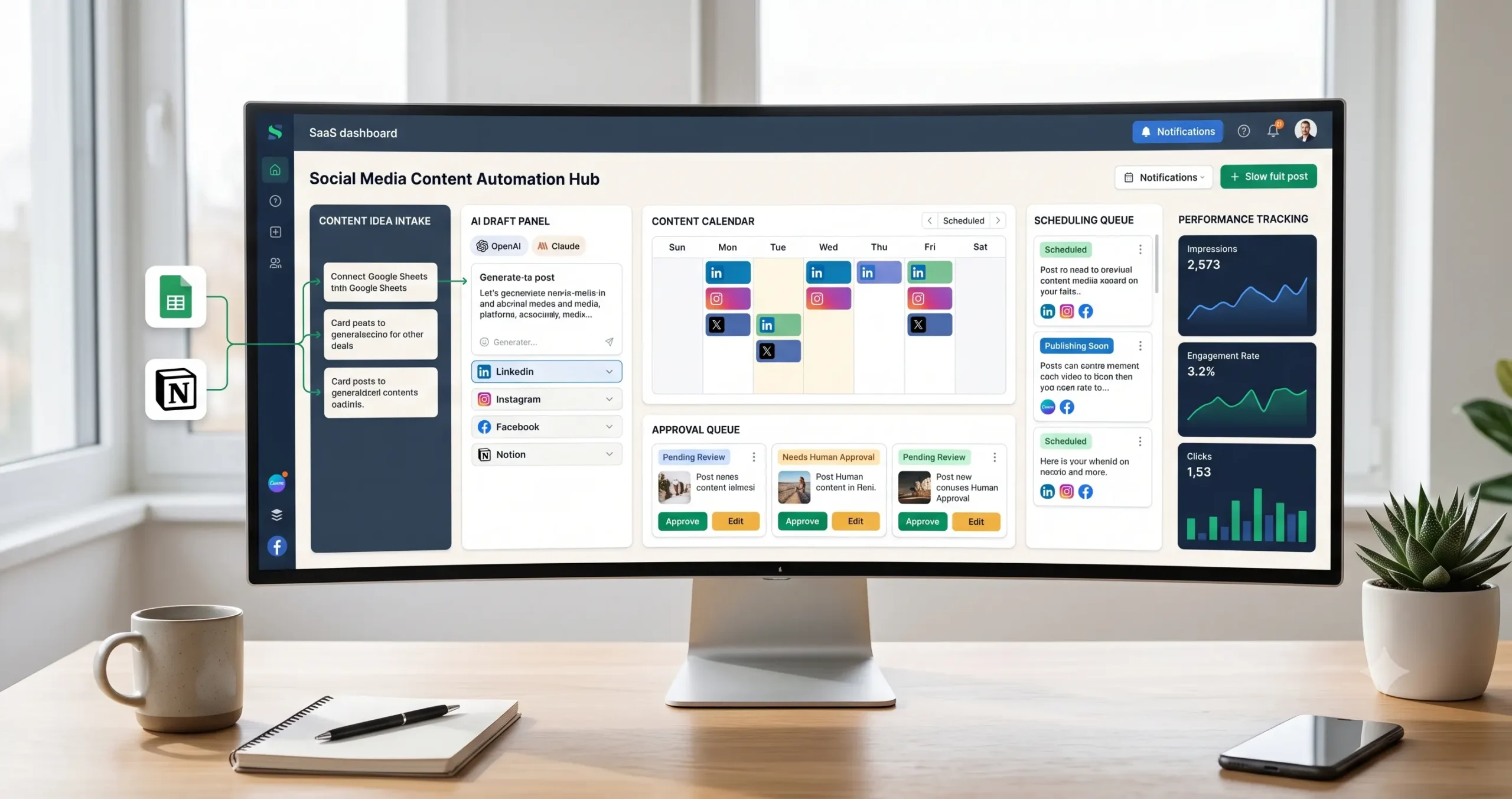
This template gives you the workflow logic for managing social media content from idea to published post. It can capture content ideas, create a short brief, draft posts with AI, adapt the message for each platform, check required assets, create an approval task, schedule the post, log publishing status, and track performance later.
A simple version can turn a content idea into draft captions and a review task. A more advanced version can connect your content calendar, AI drafts, Canva assets, platform versions, approval workflow, scheduling tool, analytics tracker, and weekly reporting workflow.
| Automation job | Example | Why it helps |
|---|---|---|
| Capture content ideas | Idea from Notion, Airtable, Google Sheets, Slack, form, content calendar, or meeting notes. | Keeps ideas from getting lost. |
| Create content brief | Audience, topic, offer, angle, platform, goal, CTA, and source link. | Gives AI enough context to draft useful posts. |
| Draft social posts | AI prepares initial captions, hooks, short posts, long posts, and CTA variations. | Saves writing time without skipping review. |
| Adapt by platform | Create LinkedIn, Instagram, Facebook, X, TikTok, or YouTube versions. | Prevents one generic post from being reused everywhere. |
| Check creative assets | Confirm image, video, carousel, thumbnail, link, hashtag, or source asset. | Reduces publishing mistakes. |
| Route approval | Create human review task before scheduling brand-facing content. | Protects brand voice, claims, and accuracy. |
| Schedule publishing | Send approved posts to Buffer, Later, Hootsuite, native scheduler, or another tool. | Improves consistency. |
| Track performance | Log published status, impressions, clicks, engagement, comments, and learnings. | Helps future content improve. |
Who Should Use It?
This social media content automation template is useful for small businesses that want consistent publishing without turning social media into a daily manual task.
- Founders who need to publish consistently but do not have a full marketing team.
- Agencies that manage posts, approvals, calendars, and reporting for clients.
- Consultants who want to turn ideas, calls, and notes into social content.
- Marketing teams that need a repeatable drafting and approval process.
- Content teams that publish across multiple platforms and need cleaner organization.
- Small businesses using Notion, Airtable, Google Sheets, Canva, Buffer, Later, Hootsuite, n8n, Make, or Zapier.
This workflow connects naturally with content operations automation, weekly AI reporting automation, meeting notes automation, email management automation, and AI agent workflows.
Workflow Overview
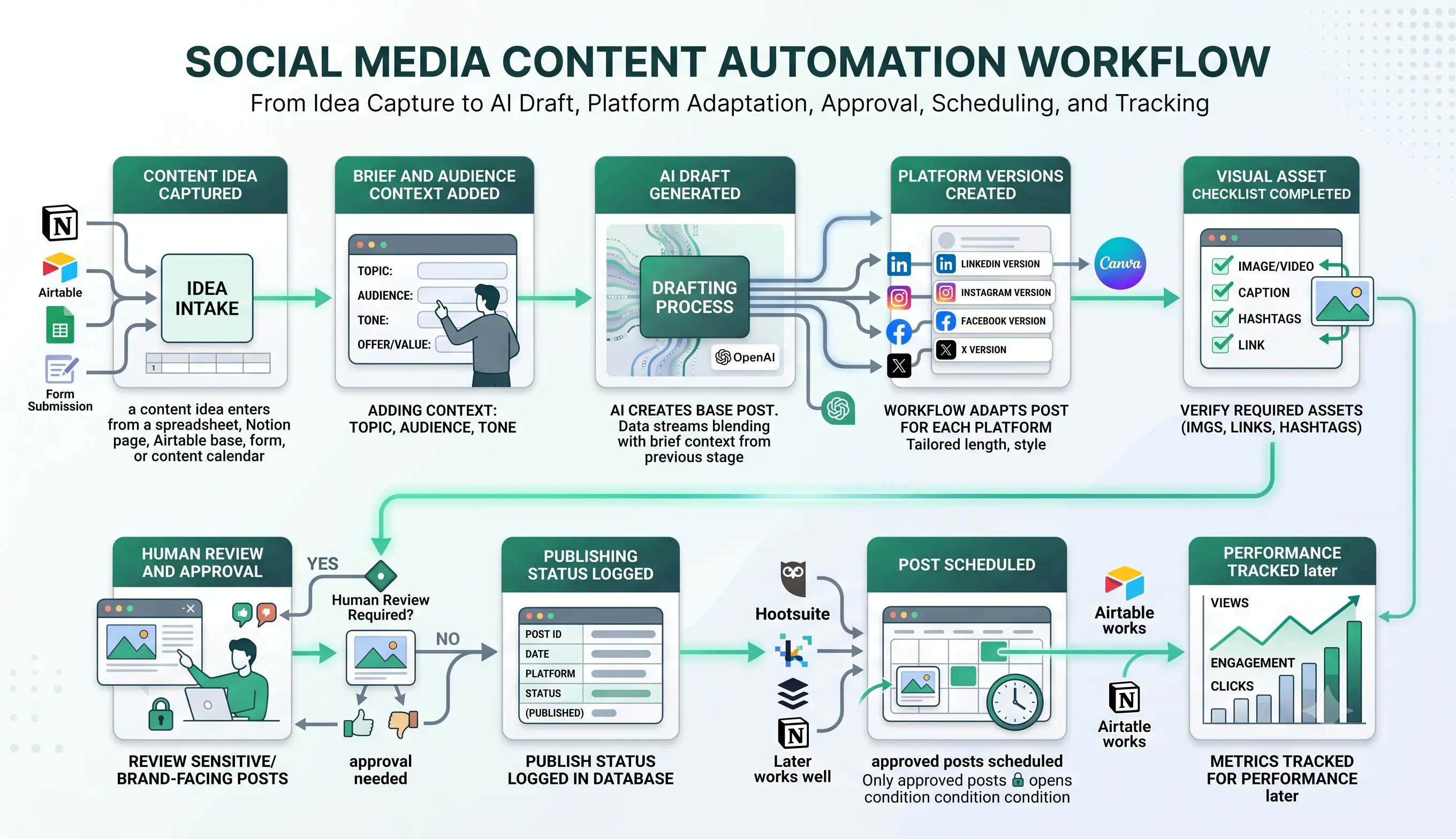
A reliable social media content workflow has nine core parts: content idea captured, brief and audience context added, AI draft generated, platform versions created, visual asset checklist completed, human review and approval, post scheduled, publishing status logged, and performance tracked.
| Workflow step | What happens | Output |
|---|---|---|
| Content idea captured | An idea enters from a calendar, spreadsheet, form, Slack message, meeting note, or content database. | New content item is created. |
| Brief and audience context added | The workflow collects audience, topic, goal, CTA, offer, source, and platform. | Content brief is ready. |
| AI draft generated | AI creates draft post copy based on the brief and rules. | Initial caption or post draft is created. |
| Platform versions created | The workflow adapts the content for LinkedIn, Instagram, Facebook, X, TikTok, or YouTube. | Platform-specific versions are ready. |
| Visual asset checklist completed | The workflow checks whether the image, video, carousel, thumbnail, or link is present. | Asset readiness is confirmed. |
| Human review and approval | A reviewer checks brand voice, claims, links, formatting, and sensitivity. | Approved, edited, rejected, or held. |
| Post scheduled | Approved content is scheduled in a publishing tool or native platform scheduler. | Post enters calendar or queue. |
| Publishing status logged | The workflow records scheduled, published, failed, or needs reschedule status. | Publishing history stays visible. |
| Performance tracked | Metrics are logged after publishing. | Future content decisions improve. |
How the Social Media Content Automation Workflow Works
The workflow should start with one content source. That source may be a Notion database, Airtable base, Google Sheet, content calendar, internal form, Slack message, or project management task. Do not begin by trying to automate every platform and every content type at once.
Once an idea enters the workflow, the system creates a brief, drafts the post, adapts it for each selected platform, checks required assets, sends it to review, schedules the approved version, logs the publishing status, and tracks performance later.
Step 1: Capture the content idea
The trigger can be a new row in a content calendar, a submitted idea form, a Slack message, a Notion page, a published blog post, a meeting note, or a campaign task. Start with one trigger so the workflow stays easy to debug.
Step 2: Create a clear content brief
The workflow should collect topic, audience, goal, platform, offer, source material, CTA, tone, and any compliance or brand rules. Without a brief, AI-generated posts usually become generic.
Step 3: Generate the first draft
AI can draft the first version of the post, but it should use only the approved brief and source material. It should not invent statistics, customer results, product claims, testimonials, pricing, or promises.
Step 4: Adapt the post by platform
A LinkedIn post, Instagram caption, X post, Facebook Page update, TikTok caption, and YouTube community post should not all be identical. Adapt length, tone, structure, formatting, CTA, and asset needs by platform.
Step 5: Check assets and links
Before approval, the workflow should confirm whether the post needs an image, video, carousel, document, link, thumbnail, hashtags, UTM link, or campaign tag.
Step 6: Send to human review
Brand-facing content should be reviewed before scheduling. The reviewer should check the audience, claims, brand voice, links, visuals, platform fit, and whether the post should be published at all.
Step 7: Schedule and log the post
After approval, the workflow can send the post to a scheduler or create a publishing task. Buffer’s official help center explains scheduling posts inside Buffer: Buffer scheduling posts documentation. Later also documents scheduling one post to multiple social profiles while customizing the post for each profile: Later multi-profile scheduling documentation.
Required Inputs
Social media automation becomes more reliable when every content item has a clear brief, selected platforms, source material, and approval rules before AI drafts anything.
| Input | Example | Use in workflow |
|---|---|---|
| Content idea | Post topic, campaign idea, blog repurpose, customer question, meeting insight. | Starts the workflow. |
| Audience | Small business owner, agency founder, consultant, operations manager, sales team. | Shapes message and angle. |
| Platform | LinkedIn, Instagram, Facebook, X, TikTok, YouTube, Threads. | Controls format and length. |
| Source material | Blog post, internal note, webinar, client-safe insight, product page, report, podcast notes. | Prevents invented content. |
| Goal | Educate, drive traffic, promote offer, build trust, announce update, start conversation. | Controls CTA and structure. |
| CTA | Read guide, book call, download template, comment, follow, reply, visit page. | Gives the post a clear next step. |
| Asset requirements | Image, carousel, video, thumbnail, link preview, document, caption, hashtags. | Prevents incomplete scheduled posts. |
| Approval rules | Review required for claims, sensitive topics, offers, client references, paid campaigns. | Protects brand and compliance. |
Practical rule: if the workflow does not have a clear audience, source, platform, CTA, and approval owner, it should create a content review task instead of sending the post to scheduling.
Content Brief and Idea Intake Logic
The brief is the control layer of this workflow. It tells AI what to write, what not to invent, which platform to adapt for, and what the final post should achieve.
| Brief field | What to include | Review trigger |
|---|---|---|
| Topic | The core idea or message of the post. | Review if topic is vague or too broad. |
| Audience | Who the post is for and what they care about. | Review if audience is missing. |
| Source | Article, note, campaign page, product update, or approved reference. | Review if claims have no source. |
| Angle | Educational, comparison, checklist, opinion, announcement, case-safe insight. | Review strong opinions or sensitive claims. |
| Platform | LinkedIn, Instagram, Facebook, X, TikTok, YouTube, or other platform. | Review if formatting does not fit the platform. |
| CTA | Read, download, reply, comment, book, subscribe, or visit. | Review if CTA is too aggressive or unclear. |
| Restrictions | Claims to avoid, words to avoid, compliance notes, brand rules. | Review if the post touches regulated, financial, health, legal, or sensitive topics. |
If the content idea comes from a published article, connect this workflow with content operations automation. If the idea comes from calls or client meetings, connect it with meeting notes automation.
AI Social Media Content Prompt Template
AI can help create drafts, hooks, variations, and platform-specific versions, but the prompt should be controlled. The model should not invent facts, metrics, testimonials, or product claims.
Copy-paste prompt structure:
You are helping draft social media content for a small business. Use only the content brief, source material, approved claims, and brand rules provided. Do not invent statistics, case studies, customer results, testimonials, pricing, product capabilities, deadlines, guarantees, or external facts. If the content needs more evidence or human judgment, mark it as needing review.
Content context:
Topic: {{topic}}
Target audience: {{target_audience}}
Platform: {{platform}}
Goal: {{goal}}
Source material: {{source_material}}
Offer or CTA: {{cta}}
Brand voice: {{brand_voice}}
Required asset: {{asset_requirement}}
Business rules:
Approved claims: {{approved_claims}}
Claims to avoid: {{claims_to_avoid}}
Link rules: {{link_rules}}
Hashtag rules: {{hashtag_rules}}
Approval required when: {{approval_required_conditions}}
Return:
1. Platform-specific post draft
2. Short hook options
3. Suggested CTA
4. Suggested hashtags if appropriate
5. Asset requirement
6. Link recommendation
7. Claims or facts that need review
8. Human review required: yes or no
9. Reason for review decision
If your workflow builder supports structured output, ask for JSON. That makes it easier to store platform version, caption, CTA, hashtags, approval status, asset status, and publishing status in separate fields.
Platform Adaptation Rules
A good social media workflow should not copy the same caption everywhere. Platform adaptation improves clarity, formatting, and audience fit.
| Platform | Adaptation focus | Review rule |
|---|---|---|
| Professional insight, practical lesson, B2B angle, clear structure, discussion prompt. | Review business claims, examples, and outbound links. | |
| Visual-first caption, carousel idea, shorter message, image or video asset. | Review visual quality, caption clarity, and hashtag use. | |
| Facebook Page | Community-friendly update, link post, announcement, discussion question. | Review link preview and audience fit. |
| X | Shorter post, thread idea, sharp hook, concise CTA. | Review for over-compression or missing context. |
| TikTok | Video angle, hook, short script, caption, visual concept. | Review script, claims, and brand fit. |
| YouTube | Shorts caption, community post, video description idea, thumbnail note. | Review title, thumbnail, and promise accuracy. |
LinkedIn’s Page posts FAQ explains that Page admins can publish text, images, videos, and documents from LinkedIn Pages, which is useful when designing platform-specific formats for B2B posts: LinkedIn Page posts FAQ.
Approval, Scheduling, and Publishing Rules
Social media posts are public brand assets. Automation can prepare and organize them, but the first workflow version should keep approval before scheduling or publishing.
| Stage | What to check | Recommended rule |
|---|---|---|
| Draft ready | Message, audience, CTA, and source are clear. | Send to review before scheduling. |
| Asset ready | Image, video, carousel, thumbnail, or link preview is available. | Do not schedule if required asset is missing. |
| Claims checked | Any statistic, result, product claim, or external fact has a source. | Require approval for claims. |
| Platform version checked | Post fits the selected platform and format. | Review each platform version separately. |
| Approval completed | Reviewer approved final copy and assets. | Only approved posts move to scheduling. |
| Scheduled | Post has date, time, platform, asset, caption, and link. | Log scheduled status and platform URL when available. |
| Published | Post published successfully or failed. | Log result and create retry task if needed. |
Meta’s help center explains how to schedule and manage posts for a Facebook Page through Meta Business Suite, which can be useful for teams that manage Facebook and Instagram content from Meta’s own tools: Meta help center on scheduled Page posts.
Human Review and Social Media Quality Rules
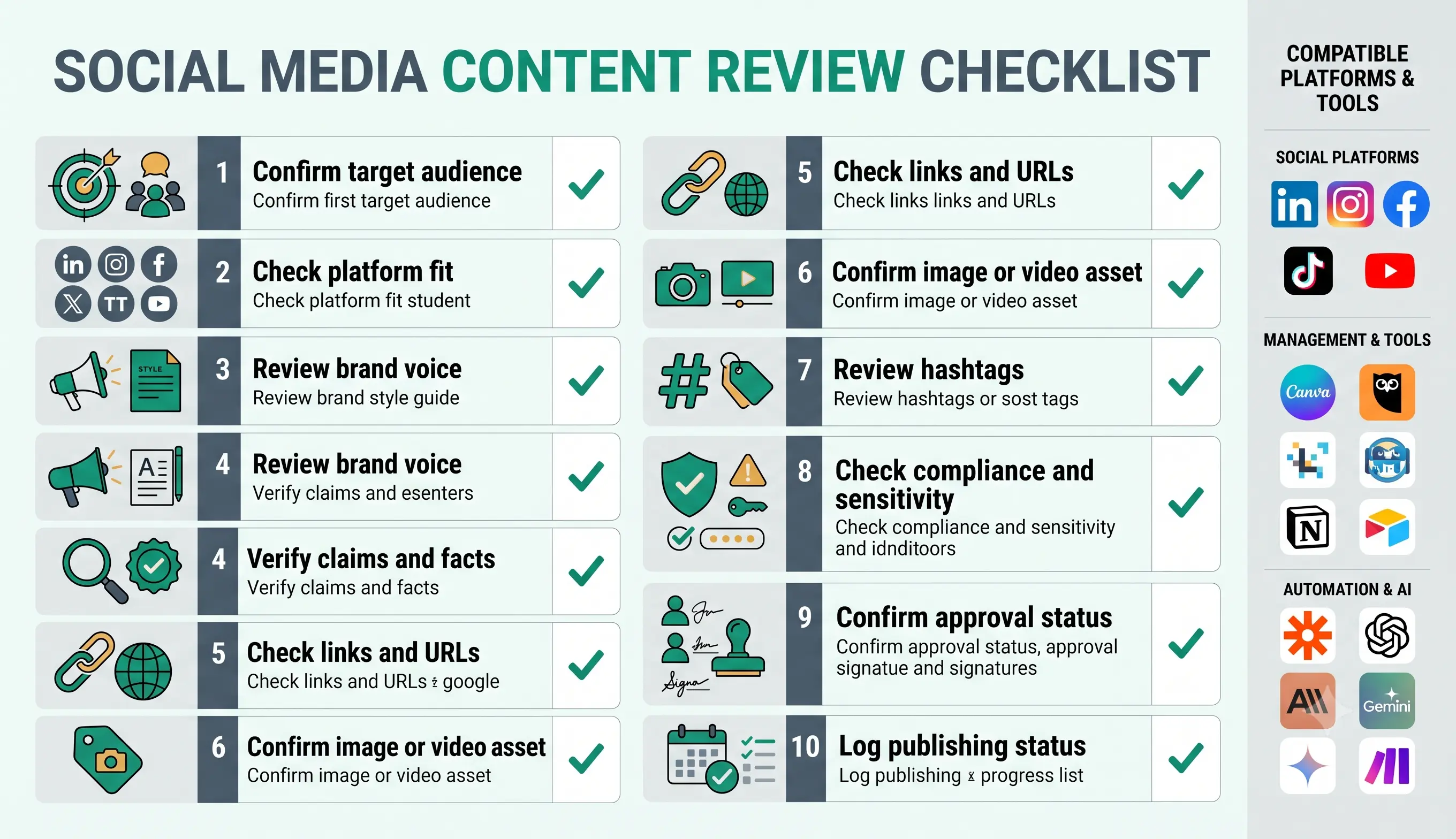
Social media content automation should make publishing more consistent, but it should not remove brand judgment. Public posts can affect trust quickly, especially when they include product claims, customer references, pricing, comparisons, regulated topics, screenshots, or strong opinions.
Human review is especially important when a post includes claims, external facts, offers, testimonials, case studies, partner names, client references, compliance-sensitive topics, or anything that could be misunderstood publicly.
| Review area | What to check | Recommended rule |
|---|---|---|
| Audience | The post speaks to the intended reader. | Review if the audience is unclear. |
| Platform fit | The post format matches the platform. | Review each platform version before scheduling. |
| Brand voice | The tone sounds like the business, not a generic AI caption. | Edit weak or generic drafts. |
| Claims and facts | Claims are accurate, sourced, and not exaggerated. | Require approval before publishing claims. |
| Links and URLs | Links work and point to the correct page. | Check every link before scheduling. |
| Visual asset | Image, video, carousel, or thumbnail matches the post. | Do not schedule if required assets are missing. |
| Hashtags | Hashtags are relevant and not spammy. | Review platform-specific hashtag use. |
| Approval status | The final version was reviewed by the right person. | Only approved posts move to scheduling. |
Testing Checklist
Test this social media content automation template before connecting it to real publishing. Use different content types, platforms, missing assets, broken links, sensitive topics, and posts that require approval.
| Test case | What to verify |
|---|---|
| Simple LinkedIn post | The workflow creates a clear B2B post and sends it to review. |
| Instagram caption with missing image | The workflow does not schedule the post until the asset is ready. |
| Blog repurpose post | The workflow uses the article source and links to the right URL. |
| Post with a statistic | The workflow flags the claim for source verification. |
| Post with sensitive topic | The workflow requires human approval before scheduling. |
| Multiple platform versions | The workflow adapts copy separately instead of duplicating one version everywhere. |
| Approved scheduled post | The workflow logs scheduled status, platform, date, and owner. |
| Publishing failure | The workflow logs failure and creates a retry or review task. |
Tools You Can Use
This template is platform-neutral. You can build it with different tools depending on where your ideas live, where drafts are reviewed, where assets are stored, and where posts are scheduled.
| Tool type | Best use | Example options |
|---|---|---|
| Content calendar | Stores content ideas, topics, campaign status, and approval status. | Notion, Airtable, Google Sheets, Trello, ClickUp, Asana. |
| Creative asset tool | Creates or stores images, videos, thumbnails, and carousels. | Canva, Google Drive, Dropbox, Figma, brand asset library. |
| Publishing platform | Schedules and publishes posts after approval. | Buffer, Later, Hootsuite, Meta Business Suite, native platform schedulers. |
| Workflow builder | Connects idea intake, AI draft, approval, scheduling, logging, and reporting. | n8n, Make, Zapier, or similar automation platforms. |
| AI model | Drafts posts, creates variations, summarizes source material, and adapts by platform. | OpenAI, Claude, Gemini, or another text-capable model. |
| Approval channel | Routes posts to a human before scheduling. | Slack, email, task tool, Notion status, Airtable approval field. |
| Analytics tracker | Tracks performance after publishing. | Platform analytics, Buffer analytics, Later analytics, Google Sheets, Looker Studio. |
If you are still choosing your automation platform, read Best AI Automation Tools for Small Business. For direct comparisons, review n8n vs Zapier, n8n vs Make for AI automation, and Make vs Zapier.
Common Mistakes
Social media automation can create weak or risky content if the workflow jumps from AI draft to publishing without checks. The safest approach is to automate planning, drafting, adaptation, reminders, and logging first, then keep approval before scheduling.
| Mistake | Why it hurts | Better approach |
|---|---|---|
| Publishing AI drafts without review | Posts may contain weak claims, generic language, or wrong tone. | Require human review before scheduling. |
| Using the same post everywhere | Each platform has different context and format expectations. | Create platform-specific versions. |
| No source material | AI may invent details or create shallow content. | Use article, notes, approved claims, or campaign brief as input. |
| Missing asset checks | Posts may be scheduled without required images, videos, or links. | Add an asset readiness checklist. |
| No approval status | Drafts and final posts get mixed together. | Use clear statuses such as draft, needs review, approved, scheduled, published. |
| No performance tracking | The team keeps publishing without learning what works. | Log key metrics and feed them into weekly reporting. |
Simple Implementation Plan
- Choose one content source. Start with Notion, Airtable, Google Sheets, or one content calendar.
- Define content statuses. Use statuses such as idea, brief ready, draft ready, needs review, approved, scheduled, published, and failed.
- Create a required brief. Include audience, topic, platform, source, CTA, asset requirement, and review owner.
- Add AI drafting. Use a controlled prompt that avoids invented claims and creates platform-specific output.
- Add asset checks. Confirm image, video, carousel, link, thumbnail, and hashtag needs.
- Add approval rules. Require review before posts are scheduled or published.
- Connect scheduling. Send approved content to a scheduling tool or create a manual scheduling task.
- Log publishing status. Record scheduled date, platform, owner, final URL, and publishing result.
- Track performance. Add impressions, clicks, engagement, comments, and learnings after publishing.
- Expand slowly. Add more platforms only after the first workflow is reliable.
Final Recommendation
Start with a social media content automation template that captures ideas, creates briefs, drafts posts, adapts content by platform, checks assets, and routes every post to approval before scheduling. Do not begin with automatic publishing.
Once the workflow is stable, connect it to content operations automation, weekly AI reporting automation, meeting notes automation, and AI agent workflows.
The best social media automation system does not replace marketing judgment. It makes the content process more consistent, keeps drafts organized, protects quality, and helps the team learn from performance over time.
FAQ
What is a social media content automation template?
A social media content automation template is a repeatable workflow that captures content ideas, creates briefs, drafts posts, adapts them by platform, checks assets, routes posts for approval, schedules publishing, logs status, and tracks performance.
Can AI create social media posts automatically?
AI can help draft captions, hooks, variations, and platform-specific versions. However, posts should be reviewed before publishing, especially when they include claims, offers, sensitive topics, links, or brand-facing messages.
Should social media posts be published automatically?
The safer first step is to automate drafting, approval, scheduling tasks, and logging. Automatic publishing should only happen after the workflow has strong approval rules, asset checks, and error handling.
What should a social media content workflow include?
It should include idea intake, content brief, AI draft, platform adaptation, asset checklist, link check, human approval, scheduling, publishing status, and performance tracking.
Which tools can I use for social media content automation?
You can combine Notion, Airtable, Google Sheets, Canva, Buffer, Later, Hootsuite, Meta Business Suite, n8n, Make, Zapier, and AI models such as OpenAI, Claude, or Gemini depending on your workflow.
What should humans review before a post is scheduled?
Humans should review audience fit, platform format, brand voice, claims, links, visuals, hashtags, CTA, sensitivity, approval status, and whether the post should be published at all.