Customer Feedback Automation Template for Small Businesses
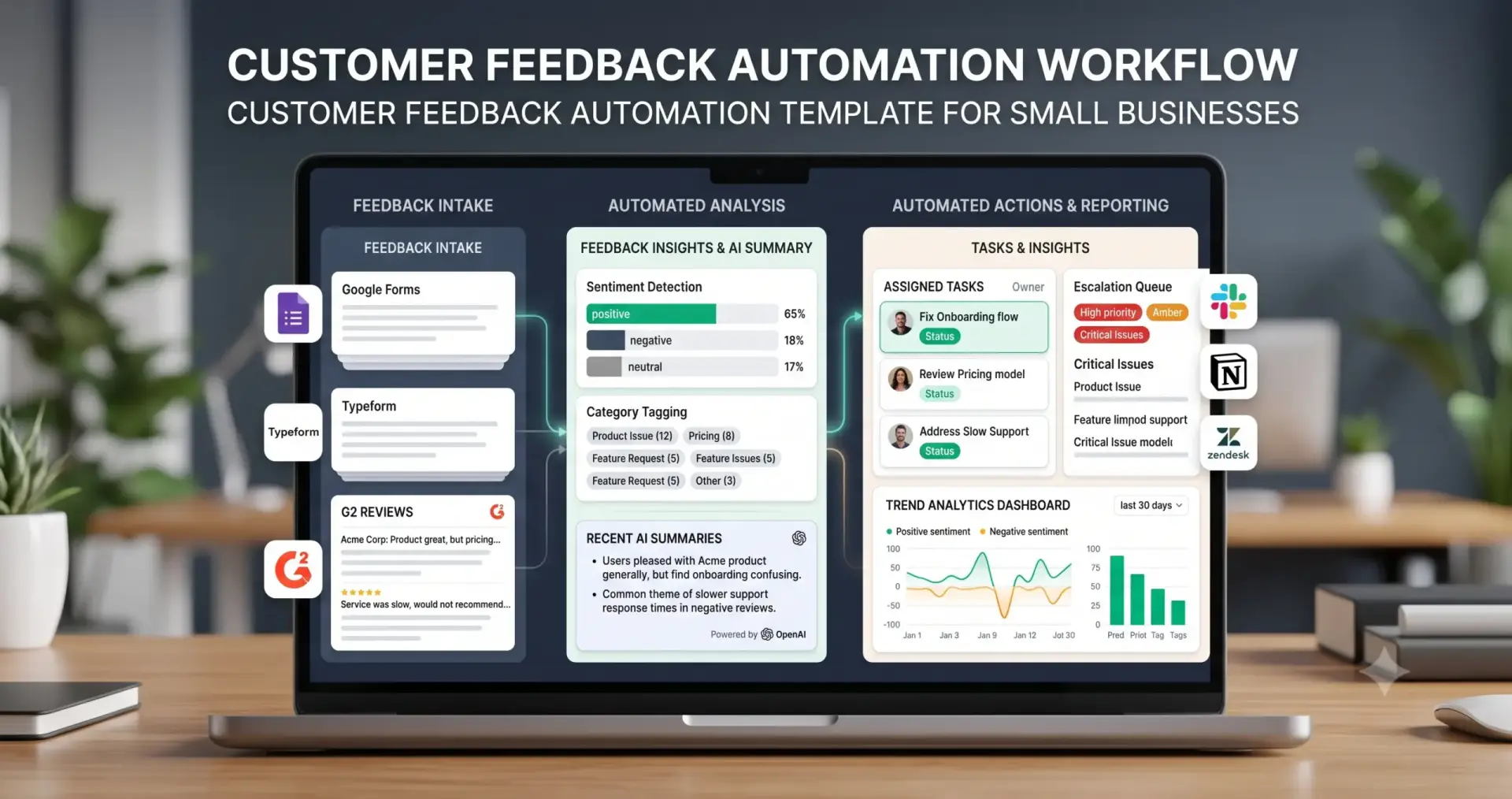
A customer feedback automation template helps small businesses collect feedback from surveys, forms, reviews, support conversations, emails, and customer messages, then classify it, detect sentiment, summarize recurring issues, create tasks, escalate urgent problems, and log insights for reporting.
This template is useful for founders, agencies, SaaS teams, support teams, customer success teams, consultants, and service businesses that receive feedback but struggle to turn it into action. The goal is not to let AI decide what customers really mean without review. The goal is to organize feedback faster while keeping human judgment for complaints, churn risks, sensitive issues, product decisions, and public responses.
In this guide, you will learn how to build a practical customer feedback workflow, what inputs you need, where AI can help, how to classify feedback, when to escalate issues, and how to turn feedback into useful support, product, sales, and operations tasks. If you are new to automation, start with our AI automation for small business guide, then explore the full TakeYourAI workflow templates library.
Quick answer: Use this customer feedback automation template when your business needs to collect feedback, classify comments, detect sentiment, summarize customer issues, tag recurring themes, create support or product tasks, escalate urgent complaints, and report customer insights. Automate intake, tagging, summarization, routing, and reporting. Keep human review for angry feedback, churn risk, refund requests, public reviews, sensitive accounts, product decisions, and anything that affects customer trust.
What This Customer Feedback Automation Template Does
This template gives you the workflow logic for turning customer feedback into structured action. It can receive feedback from a form, survey, review site, support ticket, email, chat message, or CRM note, then classify the feedback, detect sentiment, summarize the issue, assign tags, create tasks, escalate urgent cases, and store the insight for reporting.
A simple version can collect feedback responses and add them to a tracker. A more advanced version can connect surveys, support tools, review platforms, CRM records, AI summaries, sentiment scoring, escalation rules, product feedback boards, and weekly reporting.
| Automation job | Example | Why it helps |
|---|---|---|
| Collect feedback | Survey response, form submission, support rating, review, email, chat message, or customer note. | Centralizes customer voice from multiple sources. |
| Classify feedback | Bug, complaint, feature request, praise, churn risk, pricing concern, onboarding issue, support issue. | Routes feedback to the right workflow. |
| Detect sentiment | Positive, neutral, negative, angry, urgent, disappointed, confused, satisfied. | Helps prioritize customer issues. |
| Summarize response | Create a short summary of a long review, survey answer, or support conversation. | Saves time before review and routing. |
| Create tasks | Create support ticket, product task, bug report, sales follow-up, or operations task. | Turns feedback into action. |
| Escalate urgent issues | Refund request, cancellation risk, angry customer, public complaint, broken feature, high-value account. | Prevents serious feedback from being missed. |
| Report recurring themes | Weekly summary of most common complaints, feature requests, praise, and churn signals. | Helps the business learn from patterns. |
Who Should Use It?
This customer feedback automation template is useful for small businesses that receive customer input but do not have a consistent system for analyzing it and acting on it.
- Founders who want to understand what customers complain about, praise, or request most often.
- Agencies that collect feedback from clients after projects, campaigns, onboarding, or support interactions.
- SaaS teams that need to convert feedback into product tasks, support escalations, and churn-risk alerts.
- Service businesses that receive reviews, survey responses, complaints, and customer suggestions.
- Support teams that need better triage between routine feedback and urgent issues.
- Operations teams that want feedback summaries inside weekly reporting and business reviews.
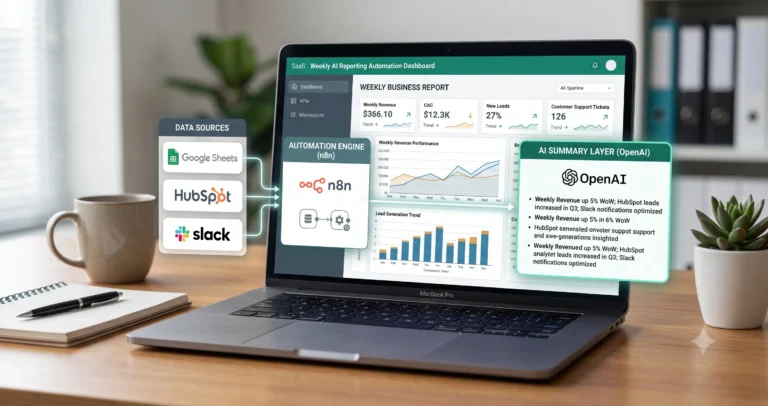
This workflow connects naturally with AI customer support triage, email management automation, CRM update automation, weekly AI reporting automation, and AI agent workflows.
Workflow Overview
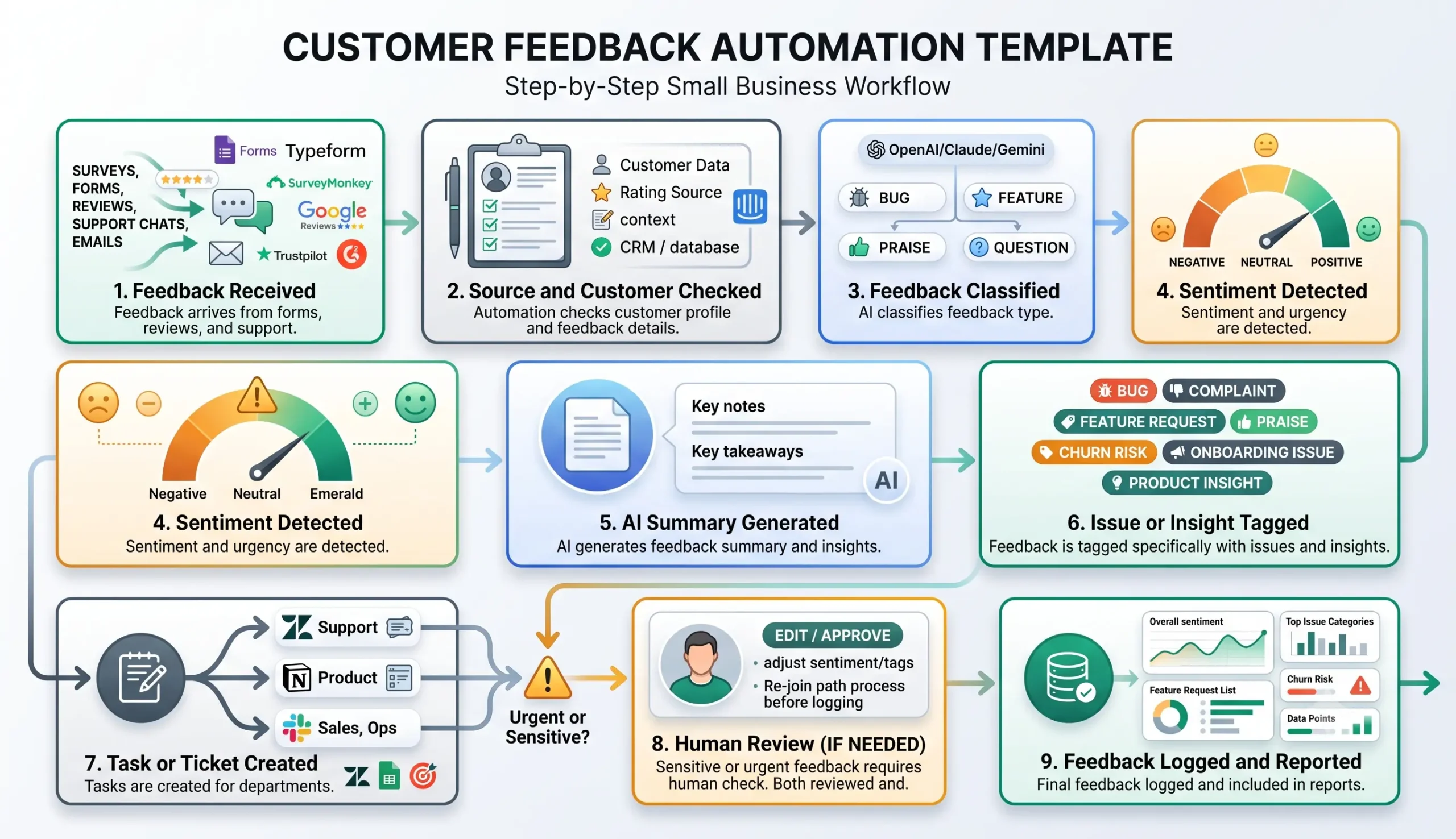
A reliable customer feedback workflow has nine core parts: feedback received, source and customer checked, feedback classified, sentiment detected, AI summary generated, issue or insight tagged, task or ticket created, human review if needed, and feedback logged and reported.
| Workflow step | What happens | Output |
|---|---|---|
| Feedback received | A response arrives from a survey, form, review, email, support ticket, chat, or CRM note. | Feedback enters the workflow. |
| Source and customer checked | The workflow checks feedback source, customer identity, rating, account status, and context. | Customer context is prepared. |
| Feedback classified | The response is categorized by type such as complaint, praise, bug, feature request, or churn risk. | Correct route is selected. |
| Sentiment detected | The workflow detects whether the feedback is positive, neutral, negative, urgent, or angry. | Priority level is assigned. |
| AI summary generated | AI summarizes the response and extracts key points. | Readable feedback summary is ready. |
| Issue or insight tagged | The workflow tags product area, support issue, onboarding problem, pricing concern, or recurring theme. | Feedback becomes searchable and reportable. |
| Task or ticket created | The workflow creates a support ticket, product task, CRM note, or operations item. | Feedback becomes trackable work. |
| Human review if needed | Sensitive, angry, public, urgent, or high-value feedback is reviewed. | Approved, escalated, corrected, or held. |
| Feedback logged and reported | The workflow stores category, sentiment, owner, status, tags, and outcome. | Insights are ready for reporting. |
How the Customer Feedback Automation Workflow Works
The workflow should start with one feedback source. That source may be Google Forms, Typeform, SurveyMonkey, a support tool, a review platform, a CRM property, an email inbox, or a spreadsheet. Do not begin by collecting feedback from every channel at once. Start with one reliable source and build a clean process around it.
Once feedback arrives, the workflow checks the source and customer context, classifies the feedback, detects sentiment, creates a short summary, tags the issue or insight, creates the right task, escalates sensitive feedback, and logs the result for future reporting.
Step 1: Capture the feedback
The trigger can be a new survey response, form submission, support rating, review, chat message, email, or CRM note. Google Forms lets you view and manage responses inside the form, and responses can also be saved to a spreadsheet for analysis: Google Forms response management documentation.
Step 2: Check source and customer context
The workflow should identify where the feedback came from, who submitted it, whether the customer is active, whether they are high-value, and whether the feedback is tied to a support ticket, product feature, account, project, or recent interaction.
Step 3: Classify the feedback
Feedback should be classified into useful categories such as praise, complaint, bug, feature request, support issue, onboarding issue, pricing concern, churn risk, product insight, or testimonial candidate.
Step 4: Detect sentiment and urgency
AI can help detect whether feedback sounds positive, neutral, negative, angry, urgent, confused, disappointed, or satisfied. Sentiment should influence priority, but it should not be the only factor. A calm message from a high-value customer about a serious issue can still require urgent review.
Step 5: Summarize and tag the feedback
The workflow should create a short summary, tag the issue, identify the affected area, and capture the suggested next action. Typeform’s response documentation shows how collected answers can be explored, filtered, searched, and downloaded inside the Results panel, which is useful for feedback workflows built around forms: Typeform responses documentation.
Step 6: Create a task or ticket
Feedback should become work only when action is needed. A bug may become a product task, a complaint may become a support escalation, a churn risk may become a customer success task, and repeated praise may become a testimonial review item.
Step 7: Escalate sensitive feedback
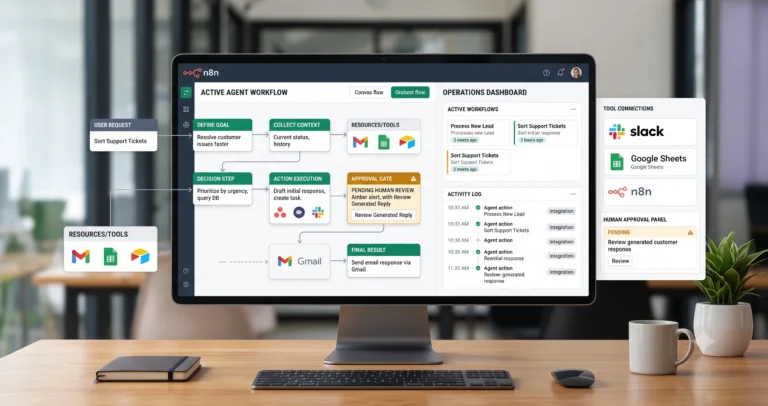
Angry feedback, refund requests, public complaints, legal threats, account issues, and high-value customer concerns should go to a human. Do not let automation send public replies or promise resolutions without review.
Step 8: Log and report insights
Store the feedback category, sentiment, source, customer segment, owner, status, recurring theme, and final outcome. SurveyMonkey’s Analyze Results documentation is a useful reference for viewing, filtering, and exporting survey results for analysis: SurveyMonkey Analyze Results documentation.
Required Inputs
Customer feedback automation becomes more reliable when each feedback item includes enough context to classify, prioritize, route, and report the insight correctly.
| Input | Example | Use in workflow |
|---|---|---|
| Feedback source | Survey, form, review site, support ticket, email, chat, CRM note, app response. | Starts the workflow and helps interpret context. |
| Customer identity | Name, email, company, account ID, customer segment, plan, or ticket ID. | Connects feedback to the right customer record. |
| Feedback text | Survey answer, review comment, support note, complaint, praise, feature request. | Used for classification, sentiment, and summary. |
| Rating or score | CSAT, NPS, star rating, thumbs up/down, numeric score, satisfaction response. | Helps prioritize and report feedback. |
| Related product or service area | Onboarding, support, billing, delivery, product feature, pricing, communication. | Controls owner assignment and tagging. |
| Customer context | Plan, value, status, recent issue, ticket history, last interaction, account owner. | Helps decide escalation level. |
| Routing rules | Support issues to support, feature requests to product, churn risk to customer success. | Creates tasks for the right team. |
| Review rules | Review required for angry, sensitive, legal, public, refund, or high-value feedback. | Keeps risky feedback under human control. |
Practical rule: if the workflow cannot identify the feedback source, customer context, category, urgency, or safe next action, it should create a review task instead of making confident decisions.
Feedback Classification and Tagging Logic
Classification is the control layer of this feedback workflow. It decides whether the response becomes a support task, product insight, churn-risk alert, testimonial candidate, reporting item, or simple archive.
| Feedback type | Automation action | Review trigger |
|---|---|---|
| Complaint | Create support task, summarize issue, assign owner, escalate if urgent. | Angry tone, refund request, public review, legal threat, high-value account. |
| Bug report | Create product or engineering task with steps, source, affected area, and evidence. | Unclear reproduction steps or high-impact failure. |
| Feature request | Tag product area, summarize request, add to product feedback board. | Enterprise customer, repeated request, revenue impact, unclear scope. |
| Praise | Log positive feedback and consider testimonial review. | Review before using publicly. |
| Churn risk | Create urgent customer success task and notify account owner. | Always review. |
| Onboarding issue | Create support or onboarding task and tag recurring friction point. | High-value customer or repeated pattern. |
| Pricing concern | Send to sales, founder, or customer success review. | Always review before responding. |
| General suggestion | Log as insight and include in trend reporting. | Review if repeated or strategically important. |
If feedback arrives through support conversations, connect this workflow with AI customer support triage. If feedback arrives through email, connect it with email management automation.
AI Customer Feedback Prompt Template
AI can help summarize and classify feedback, but the prompt should be strict. The model should not invent intent, exaggerate customer emotion, promise fixes, or decide product priorities without review.
Copy-paste prompt structure:
You are helping organize customer feedback for a small business. Use only the feedback text, rating, source, customer context, and business rules provided. Do not invent customer intent, promises, product decisions, refunds, timelines, or public responses. If the feedback is unclear, sensitive, urgent, public, or high-value, route it to human review.
Feedback context:
Source: {{feedback_source}}
Customer name or ID: {{customer_id}}
Customer segment or plan: {{customer_segment}}
Rating or score: {{rating}}
Feedback text: {{feedback_text}}
Related product, service, ticket, or project: {{related_record}}
Previous customer context: {{customer_history}}
Business rules:
Feedback categories: {{feedback_categories}}
Sentiment rules: {{sentiment_rules}}
Tagging rules: {{tagging_rules}}
Owner routing rules: {{owner_rules}}
Escalation required when: {{escalation_conditions}}
Return:
1. Feedback category
2. Sentiment
3. Urgency level
4. Short summary
5. Key issue or insight
6. Suggested tags
7. Suggested owner
8. Suggested task or ticket title
9. Recommended next action
10. Whether human review is required
11. Reason for review decision
If your workflow builder supports structured output, ask for JSON. That makes it easier to store category, sentiment, urgency, tags, owner, task title, and review status in separate fields.
Sentiment, Urgency, and Escalation Rules
Sentiment helps prioritize feedback, but it should not replace business context. A short negative comment from a high-value customer may need faster review than a long neutral suggestion from an unknown source.
| Signal | Priority | Recommended action |
|---|---|---|
| Angry complaint | High | Create urgent support task and require human review. |
| Refund request | High | Escalate to support, finance, or founder review. |
| Churn risk | High | Notify account owner or customer success owner immediately. |
| Public negative review | High | Create response draft but require approval before replying publicly. |
| Bug affecting usage | Medium to high | Create product or support task with evidence. |
| Feature request | Medium | Tag product area and include in recurring product feedback report. |
| Positive review | Low to medium | Log as praise and consider testimonial review. |
| Unclear feedback | Review | Ask for clarification or route to human review. |
If you use Zendesk for support feedback, Zendesk documents CSAT surveys as a way for customers to rate solved tickets and provide feedback about their support experience: Zendesk CSAT survey documentation.
Task Creation and Reporting Rules
Customer feedback becomes valuable when it creates the right action or insight. Not every feedback item needs a task, but every useful feedback item should be logged in a way that can be reviewed later.
| Output | When to create it | Recommended rule |
|---|---|---|
| Support ticket | Customer needs help, reports a problem, or requests a fix. | Create ticket with summary, category, sentiment, and source link. |
| Product task | Feedback mentions bug, feature request, UX friction, or product improvement. | Attach original feedback and tag affected product area. |
| Customer success task | Feedback shows churn risk, dissatisfaction, confusion, or high-value account concern. | Assign owner and require timely follow-up. |
| Sales or pricing review | Feedback mentions pricing, packaging, competitor comparison, or buying objection. | Send to sales or founder review. |
| Testimonial review | Feedback is positive and specific. | Review before using publicly and get permission when needed. |
| Weekly insight | Feedback repeats across customers or affects strategy. | Add to weekly reporting or product review summary. |
For businesses using public review platforms, Trustpilot’s business analytics page describes dashboards for tracking ratings, star distribution, review tags, and TrustScore, which are useful signals for recurring feedback reports: Trustpilot dashboard and analytics.
Human Review and Customer Feedback Quality Rules
Customer feedback automation should make listening easier, but it should not remove human judgment. Feedback often contains emotion, context, frustration, incomplete information, public reputation risk, or product decisions that require interpretation.
Human review is especially important when feedback is negative, public, urgent, sensitive, related to churn, tied to a high-value customer, or used for product roadmap decisions, marketing claims, testimonials, or public responses.
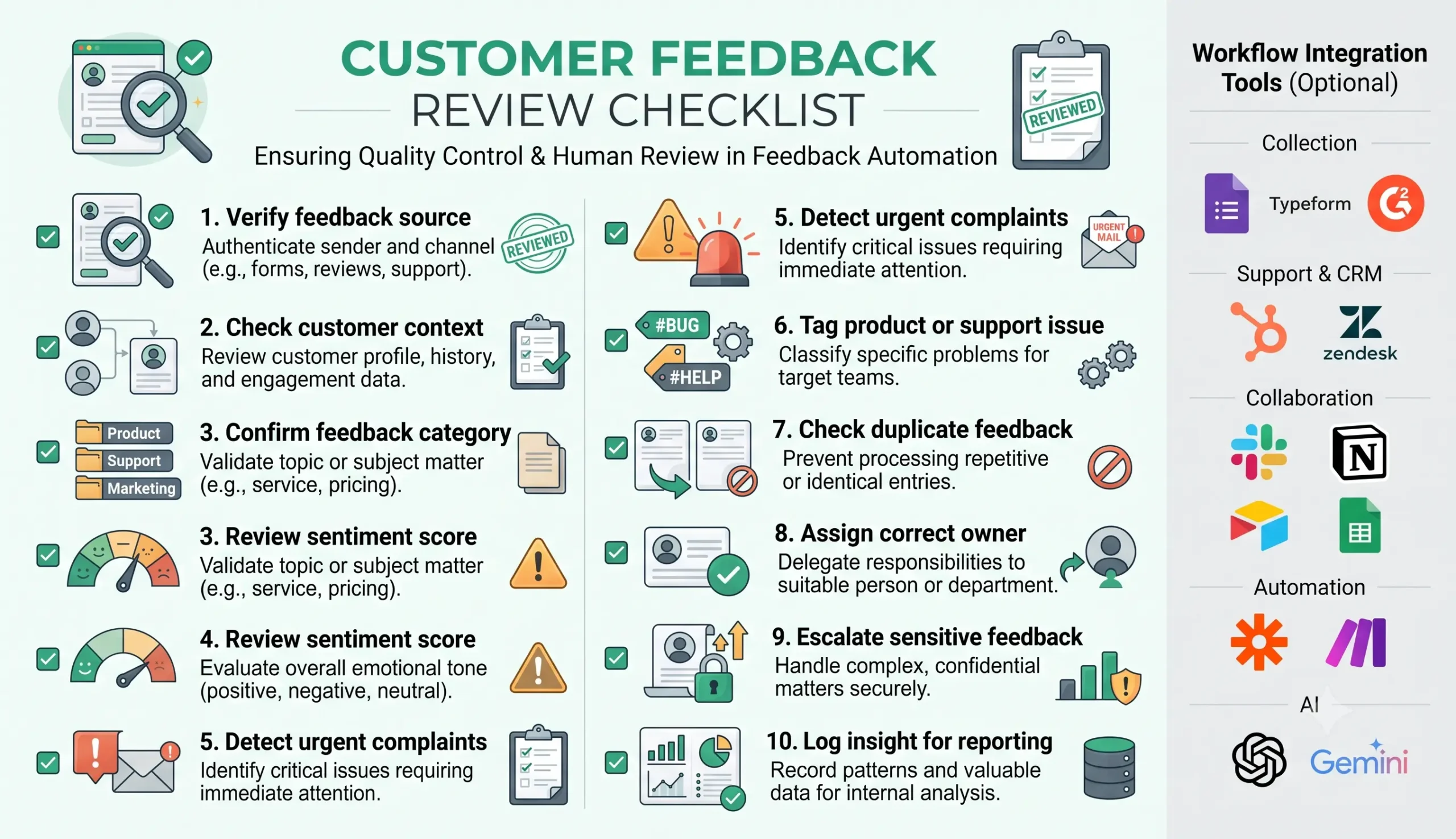
| Review area | What to check | Recommended rule |
|---|---|---|
| Feedback source | The workflow correctly identifies where the feedback came from. | Review unknown or public sources. |
| Customer context | The feedback is linked to the right customer, ticket, account, or project. | Review if customer match is uncertain. |
| Category | The feedback type is accurate. | Review mixed, vague, or complex feedback. |
| Sentiment | The sentiment matches the actual message and business impact. | Review angry, sarcastic, or emotionally complex feedback. |
| Duplicate feedback | The same issue is not being counted incorrectly. | Group similar feedback before reporting trends. |
| Owner assignment | The right team owns the response or task. | Review cross-functional issues. |
| Public response | The reply is accurate, respectful, and safe. | Always review before replying publicly. |
| Reporting insight | The insight is based on enough feedback and not one isolated comment. | Review before using in strategic decisions. |
Testing Checklist
Test this customer feedback automation template before using it across all feedback channels. Use positive reviews, angry complaints, vague survey answers, duplicate requests, feature suggestions, churn-risk comments, and public reviews.
| Test case | What to verify |
|---|---|
| Positive feedback | The workflow logs praise and routes testimonial candidates to review. |
| Angry complaint | The workflow escalates to a human and does not send an automatic reply. |
| Feature request | The workflow tags product area and adds the request to product feedback tracking. |
| Bug report | The workflow creates a support or product task with enough context. |
| Churn-risk response | The workflow notifies the right owner quickly. |
| Duplicate feedback | The workflow groups similar feedback instead of overcounting. |
| Public negative review | The workflow drafts a response but requires approval before posting. |
| Vague feedback | The workflow marks uncertainty and routes to review or clarification. |
Tools You Can Use
This template is platform-neutral. You can build it with different tools depending on where feedback arrives, where tasks are managed, where customer data lives, and where insights are reported.
| Tool type | Best use | Example options |
|---|---|---|
| Feedback collection | Collects survey responses, forms, ratings, and open-text feedback. | Google Forms, Typeform, Tally, SurveyMonkey, website forms. |
| Review platform | Collects public customer reviews and ratings. | Google Reviews, Trustpilot, G2, Capterra, app marketplace reviews. |
| Support system | Connects feedback with support tickets and customer issues. | Zendesk, Intercom, Help Scout, Freshdesk, HubSpot Service Hub. |
| CRM | Links feedback to customer accounts, deals, contacts, and lifecycle stage. | HubSpot, Salesforce, Pipedrive, Airtable, Notion, spreadsheet-based CRM. |
| Task management | Creates support, product, operations, or customer success tasks. | Asana, Trello, ClickUp, Notion, Airtable, Monday.com. |
| Workflow builder | Connects feedback intake, AI classification, routing, tasks, escalation, and reporting. | n8n, Make, Zapier, or similar automation platforms. |
| AI model | Summarizes feedback, detects sentiment, tags issues, and prepares review notes. | OpenAI, Claude, Gemini, or another text-capable model. |
| Reporting layer | Shows recurring issues, sentiment trends, top requests, and customer themes. | Google Sheets, Airtable, Looker Studio, Notion, weekly AI reports. |
If you are still choosing your automation platform, read Best AI Automation Tools for Small Business. For direct comparisons, review n8n vs Zapier, n8n vs Make for AI automation, and Make vs Zapier.
Common Mistakes
Customer feedback automation can become misleading if it summarizes too aggressively, ignores context, or turns one loud comment into a strategic conclusion. The safest approach is to automate organization and routing first, then keep review for interpretation and decisions.
| Mistake | Why it hurts | Better approach |
|---|---|---|
| Trusting sentiment alone | Sentiment can miss business impact or customer value. | Combine sentiment with customer context, source, and urgency. |
| Ignoring public review risk | Public replies can affect reputation. | Require human approval before public responses. |
| No category system | Feedback becomes a messy list with no action. | Create clear categories and tags. |
| Counting duplicates as separate trends | Reports may exaggerate some issues. | Group similar feedback and track recurrence carefully. |
| Creating tasks for every comment | The team becomes overloaded with low-value tasks. | Create tasks only when action is needed. |
| No reporting loop | The business handles feedback one by one without learning from patterns. | Summarize recurring themes weekly or monthly. |
Simple Implementation Plan
- Choose one feedback source. Start with one form, survey, support rating, review channel, or customer email workflow.
- Define feedback categories. Use categories such as complaint, bug, feature request, praise, churn risk, pricing concern, and onboarding issue.
- Collect customer context. Capture customer ID, account status, plan, ticket, rating, source, and related record when available.
- Add AI classification. Ask AI to classify, summarize, detect sentiment, tag the issue, and identify urgency.
- Create routing rules. Send support issues to support, product insights to product, churn risk to customer success, and pricing concerns to sales or founder review.
- Add escalation rules. Require review for angry, public, urgent, sensitive, high-value, legal, refund, or churn-risk feedback.
- Create tasks only when needed. Avoid turning every feedback item into a task.
- Log feedback consistently. Store source, category, sentiment, tag, customer segment, owner, status, and outcome.
- Add reporting. Create weekly or monthly summaries of recurring issues, praise, feature requests, churn signals, and customer themes.
- Test with real examples. Use positive, negative, vague, urgent, duplicate, public, and high-value feedback before expanding.
Final Recommendation
Start with a customer feedback automation template that collects feedback, classifies it, detects sentiment, summarizes the message, tags the issue, creates tasks when needed, escalates risky feedback, and logs insights for reporting. Do not begin by auto-replying to customers or making product decisions from AI summaries alone.
Once the workflow is stable, connect it to AI customer support triage, email management automation, CRM update automation, weekly AI reporting automation, and AI agent workflows.
The best feedback automation system does not replace listening. It helps the team hear customers faster, route issues to the right owner, and turn repeated feedback into better decisions.
FAQ
What is a customer feedback automation template?
A customer feedback automation template is a repeatable workflow that collects feedback, checks customer context, classifies comments, detects sentiment, summarizes responses, tags issues, creates tasks, escalates urgent feedback, and logs insights for reporting.
Can AI analyze customer feedback?
AI can help summarize feedback, classify comments, detect sentiment, identify recurring themes, and prepare review notes. However, sensitive feedback, public responses, churn risk, and product decisions should still involve human review.
What customer feedback should be escalated?
Escalate angry complaints, refund requests, public negative reviews, legal threats, churn-risk comments, high-value customer concerns, sensitive issues, and feedback that may require a public or strategic response.
What categories should customer feedback use?
Common categories include complaint, bug report, feature request, praise, churn risk, onboarding issue, pricing concern, support issue, product insight, testimonial candidate, and general suggestion.
Should feedback automation create tasks for every response?
No. Create tasks only when action is needed. Some feedback should be logged for reporting, grouped with similar feedback, or reviewed later as part of recurring insight analysis.
Which tools can I use for customer feedback automation?
You can combine Google Forms, Typeform, Tally, SurveyMonkey, Google Reviews, Trustpilot, G2, Capterra, Zendesk, Intercom, HubSpot, Airtable, Google Sheets, n8n, Make, Zapier, and AI models such as OpenAI, Claude, or Gemini depending on your workflow.