
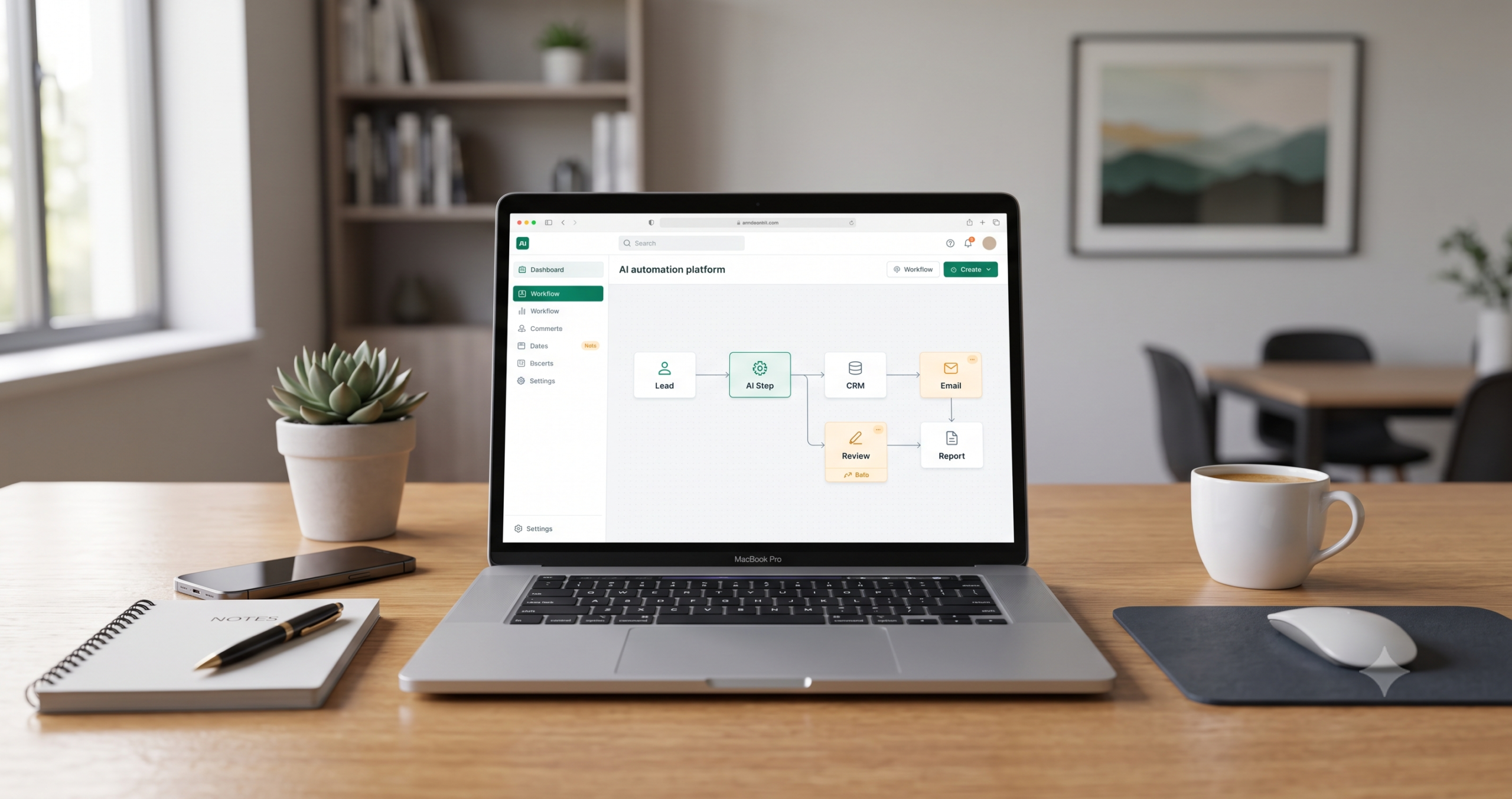
AI Automation for Small Business: The Complete Beginner’s Guide
AI automation for small business is not about replacing your team with robots or chasing every new AI tool. For most small businesses, the real opportunity is more practical: reduce repetitive work, respond faster to leads and customers, keep business data cleaner, and build workflows that move information between tools without constant manual effort.
A small business usually does not need “more AI.” It needs fewer forgotten follow-ups, fewer copy-paste tasks, fewer manual handoffs, fewer messy spreadsheets, and fewer hours wasted moving the same information from one app to another.
This guide explains how AI automation works for small businesses, how it differs from traditional automation and AI agents, which workflows to automate first, what tools to compare, and how to build safer systems without wasting money or exposing sensitive data.
If you want examples after the foundation, read our 15 practical AI automation workflow examples. If you are ready to choose your stack, use Best AI Automation Tools for Small Business, then compare workflow builders such as n8n vs Zapier, n8n vs Make, and Make vs Zapier.
What Is AI Automation for Small Business?
AI automation for small business means using AI tools and workflow automation platforms to reduce repetitive work across business processes such as lead routing, CRM updates, customer support triage, reporting, email follow-ups, document processing, and content repurposing.
Traditional automation moves data from one place to another using fixed rules. AI automation adds a language and reasoning layer. That means AI can help when the input is messy, human-written, or difficult to classify with simple if/then logic.
For example, a basic automation can take a website form submission and create a CRM record. An AI automation can read the message inside that form, summarize the prospect’s request, classify the lead, draft a personalized follow-up, and notify the right team member.
The value is not the AI step alone. The value comes from connecting AI to a practical workflow that already matters to the business.
A useful small business AI automation usually has seven parts: a trigger, input data, an AI step, rules or routing logic, a business action, human review, and measurement.
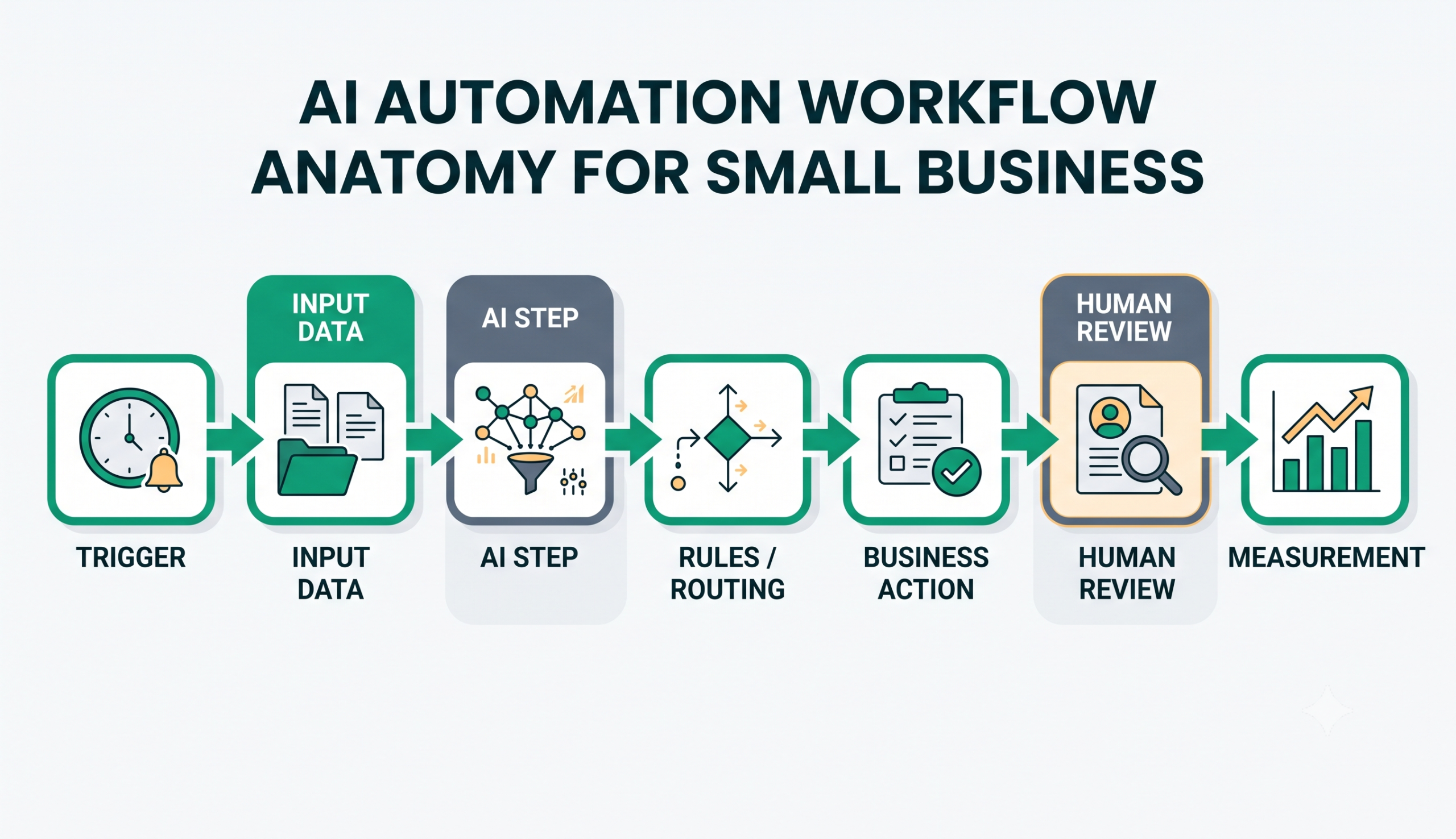
The Anatomy of an AI Automation Workflow
Before choosing tools, it helps to understand how an AI automation workflow is built. The platforms may change, but the logic is usually similar.
| Workflow Part | What It Does | Small Business Example |
|---|---|---|
| Trigger | Starts the workflow when something happens. | A new form submission, support ticket, order, email, or CRM update. |
| Input Data | Provides the information the workflow will process. | Lead message, customer email, meeting transcript, invoice, or spreadsheet row. |
| AI Step | Uses AI to summarize, classify, extract, draft, score, or route information. | Summarize a lead request or classify a support ticket by urgency. |
| Rules / Routing | Decides what happens after the AI step. | If the lead is high-fit, notify sales. If the ticket is urgent, escalate it. |
| Business Action | Creates the useful output of the workflow. | Update CRM, create task, draft email, send alert, or generate report. |
| Human Review | Adds a safety layer before important actions happen. | A person approves the draft, verifies extracted data, or checks the lead score. |
| Measurement | Tracks whether the workflow is actually useful. | Time saved, faster response time, fewer errors, cleaner data, or better follow-up. |
This structure matters because it prevents you from building random automations. Instead of asking, “Which AI tool should I use?”, you start with a better question: “Which business workflow should this automation improve?”
Traditional Automation vs AI Automation vs AI Agents
Small business owners often hear “automation,” “AI automation,” and “AI agents” used as if they mean the same thing. They are related, but they are not identical.
| Type | How It Works | Best For | Example | Main Risk |
|---|---|---|---|---|
| Traditional automation | Uses fixed rule-based logic. | Structured and predictable tasks. | When a form is submitted, add the contact to a CRM. | Breaks when input is messy or unexpected. |
| AI automation | Combines workflow automation with AI steps. | Summaries, classification, extraction, drafting, and routing. | Read a support email, classify the issue, and draft a reply. | AI can misunderstand context or produce inaccurate output. |
| AI agents | Can perform multi-step tasks with more autonomy. | More complex workflows that require planning across tools. | Research a lead, update CRM, draft follow-up, and create a task. | Requires stronger guardrails, permissions, testing, and monitoring. |
Traditional automation is usually deterministic. If the trigger happens and the condition is true, the workflow runs the same way every time.
AI automation is more flexible because it can handle unstructured text, but it is also less predictable. AI agents go further by performing more steps with more autonomy, which can be powerful but risky if you start too early.
For most small businesses, the best starting point is not a fully autonomous AI agent. The better starting point is a narrow AI automation workflow with a clear trigger, limited responsibility, and a human review step.
Start with Workflows, Not Tools
The biggest mistake small businesses make is starting with software before they understand the process. They sign up for Zapier, Make, n8n, HubSpot, Airtable, or an AI agent builder, then try to find a use for it later.
That usually leads to wasted subscriptions, half-built workflows, and automation that looks impressive but does not solve a real business problem.
A better approach is to start with one repeated business process. Before choosing any tool, write down the workflow in simple terms:
Trigger → Input Data → AI Step → Rules → Action → Human Review → Measurement
Here is a practical example:
A website visitor submits a lead form. The form includes their name, email, company, budget, and message. An AI step summarizes the request and classifies the lead. A rule checks whether the lead looks qualified. A high-fit lead is added to the CRM and sent to Slack. A sales rep reviews the lead before sending a follow-up.
That is a workflow. The tool comes after the workflow is clear.
If you want practical examples, read our guide to AI automation workflows for small business. It breaks down 15 workflow examples including lead qualification, CRM updates, support triage, reporting, onboarding, and document processing.
Best AI Automation Use Cases for Small Businesses
The best first automation is usually frequent, repetitive, easy to measure, and not too risky. Avoid starting with emotional customer conversations, legal decisions, financial approvals, or anything that could damage trust if the AI makes a mistake.
The goal of AI automation is not to connect every app you use. The goal is to remove repeated manual steps from the workflows that already slow down your business.
| Business Function | Manual Problem | AI Automation Example | Human Review Point |
|---|---|---|---|
| Lead capture | Leads wait too long for follow-up. | AI summarizes, scores, and routes leads after form submission. | Sales rep reviews the lead before outreach. |
| CRM updates | Notes and customer details stay outside the CRM. | AI extracts useful details and prepares structured updates. | Rep confirms important field changes. |
| Customer support | Inbox is slow and disorganized. | AI classifies tickets and drafts suggested replies. | Support agent approves replies before sending. |
| Sales follow-up | Prospects go cold because follow-up is delayed. | AI drafts follow-up emails based on lead context. | Human edits and approves the draft. |
| Reporting | Weekly updates take too much manual effort. | AI summarizes CRM, sales, support, or spreadsheet data. | Manager checks numbers before sharing. |
| Documents | Invoices, forms, and PDFs require manual review. | AI extracts key fields and prepares them for review. | Admin verifies extracted data before use. |
| Content repurposing | One piece of content takes too long to reuse. | AI turns a blog post into draft social posts or newsletter snippets. | Editor checks accuracy and tone. |
| Review monitoring | Negative reviews or customer feedback go unnoticed. | AI detects sentiment and flags urgent feedback. | Owner approves the response. |
Lead routing, support triage, reporting, CRM updates, and follow-up drafting are strong early candidates because they are repetitive and measurable. They also allow a human to stay in control before anything customer-facing is sent.
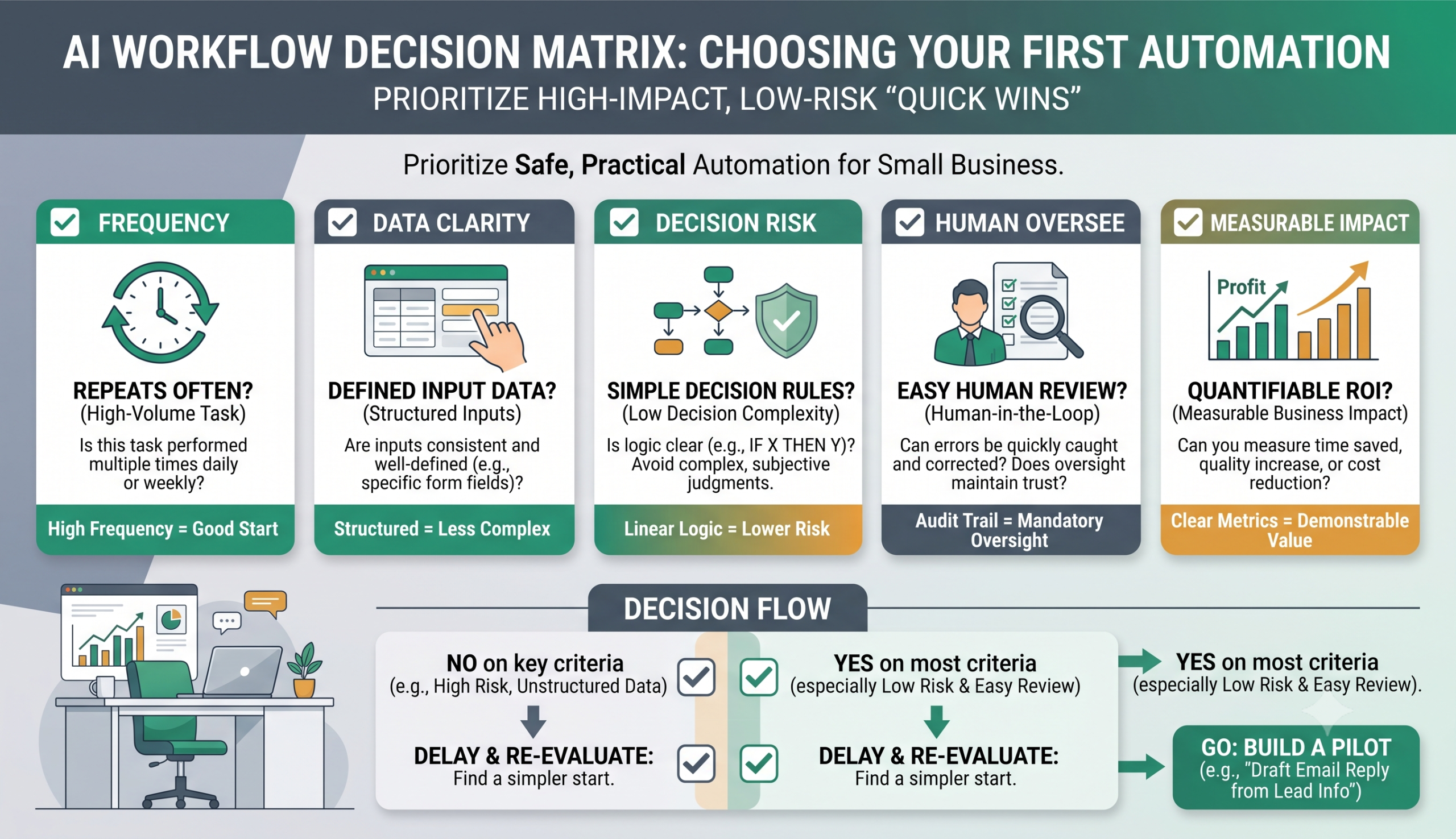
How to Choose Your First AI Automation Workflow
The wrong way to start is to ask, “What is the most advanced automation we can build?” The better question is, “Which repeated process is painful enough to automate but simple enough to test safely?”
Your first workflow should be useful, measurable, and low-risk. It should save time without creating a new operational problem.
| Selection Question | Why It Matters | Good Sign |
|---|---|---|
| Does the task repeat often? | Automation creates more value when the task happens every day or week. | Leads, support tickets, forms, reports, or CRM updates happen regularly. |
| Is the input data clear? | AI performs better when the workflow receives predictable information. | The workflow starts from forms, emails, notes, tickets, or documents. |
| Can you define a correct output? | You need to know what a good result looks like before automating. | The output can be a summary, score, draft, task, category, or update. |
| Is there a safe review step? | Human review reduces risk when AI affects customers or records. | The workflow creates drafts or suggestions before final action. |
| Can success be measured? | You need proof that the workflow is useful. | You can track time saved, faster response, fewer errors, or cleaner data. |
For most small businesses, the best first workflow is usually one of these: lead qualification, customer support triage, CRM updates, meeting summaries, weekly reporting, or document extraction.
AI Automation Tools and Stack Options
There is no single “best” AI automation tool for every small business. The right choice depends on your existing software, technical comfort, expected workflow volume, budget, privacy needs, and how much control you need.
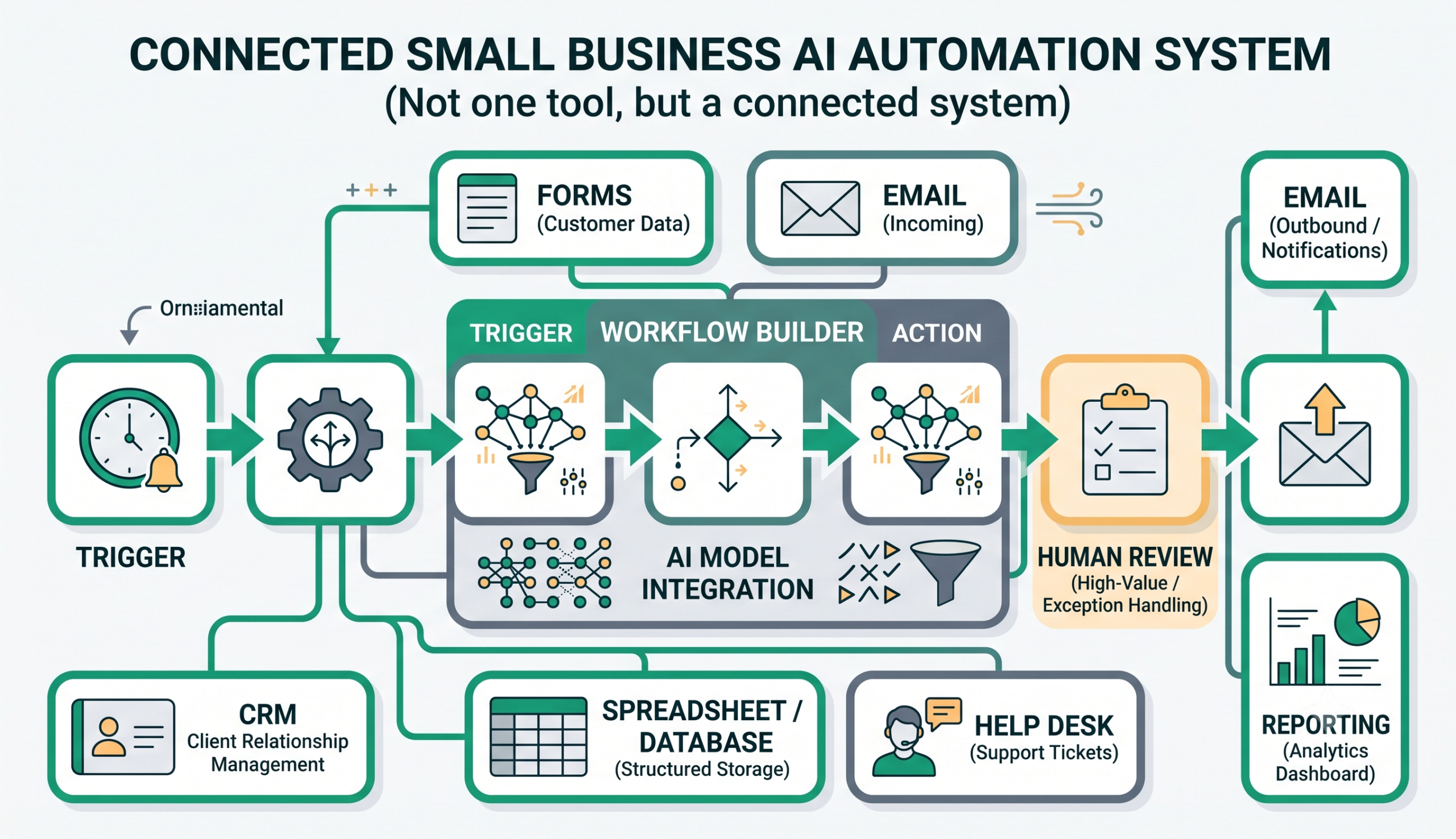
More importantly, AI automation is not one tool. It is a connected stack. A practical workflow may involve a form builder, an automation platform, an AI model, a CRM, an email tool, a spreadsheet or database, a support desk, and a human approval step.
For a broader stack-level breakdown, read Best AI Automation Tools for Small Business. That guide compares workflow builders, AI model layers, CRM and operations tools, support agents, reporting systems, and browser automation tools so you can choose the right stack before building.
No-Code and Low-Code Automation Platforms
No-code and low-code automation platforms connect apps together. They often act as the central layer between forms, CRMs, email tools, spreadsheets, AI models, and communication apps.
Zapier is often a simple starting point for beginners because it supports many app integrations and has a straightforward workflow-building experience.
Make is a visual automation platform that can be useful when you need branching logic, data transformation, or more control over how a workflow moves between modules.
n8n is more technical, but it can be powerful for teams that want deeper workflow control, advanced logic, or the option to self-host.
If you are choosing between workflow builders, compare the tools directly before committing. Read n8n vs Zapier if you are deciding between simple app automation and deeper technical workflow control. Read n8n vs Make for AI automation if you are deciding between a technical workflow builder and a visual scenario builder. Read Make vs Zapier if you are choosing between visual scenario building and simple trigger-action automation.
AI Model Providers
AI model providers are not workflow automation platforms by themselves. They are the AI layer inside the workflow. They can summarize, classify, extract, rewrite, draft, or reason over information.
For example, a workflow platform may send a support email to an AI model. The model classifies the request as billing, technical support, refund, or urgent complaint. Then the workflow platform routes the message to the correct place.
If your workflow uses AI models through an API, always review the provider’s data controls and privacy settings. For example, OpenAI publishes API data controls in its official API data documentation.
CRM, Databases, and Business Apps
Many small businesses should connect AI automation to a CRM or structured database. Otherwise, automations become scattered and hard to manage.
Tools such as HubSpot, Pipedrive, Airtable, Notion, and Google Sheets can store leads, tasks, notes, deals, records, and reports. A simple business may start with a spreadsheet or Airtable. A sales-driven business may need a dedicated CRM.
Communication and Human Review Tools
Slack, Gmail, Microsoft Teams, and help desk tools are often used as approval points. This is important because the safest small business AI automation systems do not immediately send every AI output to customers.
Instead, AI drafts, summarizes, classifies, or recommends. A human reviews the output before the final action.
| Tool Category | Examples | Best For | Beginner Difficulty |
|---|---|---|---|
| Automation platforms | Zapier, Make, n8n | Connecting apps and building workflows. | Low to medium. |
| AI models | OpenAI, Claude, Gemini | Summarizing, classifying, drafting, and extracting. | Medium. |
| CRM tools | HubSpot, Pipedrive, Airtable | Managing leads, deals, customer records, and follow-up. | Low to medium. |
| Communication tools | Slack, Gmail, Microsoft Teams | Alerts, approvals, handoffs, and internal review. | Low. |
| Knowledge tools | Notion, Google Drive, Airtable | Storing internal information and reference material. | Low to medium. |
If you are comparing platforms, start with our Best AI Automation Tools for Small Business guide, then browse the broader AI automation tool comparisons. For direct workflow-builder decisions, compare n8n vs Zapier, n8n vs Make for AI automation, and Make vs Zapier. If you want implementation-ready starting points, explore our workflow templates.
A 10-Step Roadmap to Build Your First AI Automation Workflow
Your first automation should not be a huge transformation project. It should be one narrow workflow that saves time, reduces errors, and can be tested safely.
- Identify repetitive work. Look for copy-paste tasks, manual data entry, delayed follow-ups, repeated emails, weekly reporting, or CRM cleanup.
- Choose one narrow workflow. Do not automate an entire business function first. Pick one process with a clear start and finish.
- Map the trigger, input, decision, and action. Write the workflow before opening any tool.
- Choose the minimum tool stack. Select only the automation platform, AI layer, and business apps needed for this workflow.
- Add AI only where it is useful. Use AI for summarizing, classifying, drafting, extracting, or interpreting messy text. Do not add AI where simple rules are enough.
- Test with sample data. Use fake or historical examples before using live customer data.
- Add human approval. For customer-facing, financial, legal, or sensitive outputs, keep a human review point.
- Measure time saved and errors reduced. Compare the old process to the automated one.
- Document the workflow. Record what the workflow does, what tools it uses, what data it touches, and how to troubleshoot it.
- Scale carefully. Expand only after the first workflow is stable.
How to Estimate AI Automation ROI
AI automation ROI should be calculated conservatively. Do not assume every workflow will save money immediately. The value depends on task volume, time saved, tool cost, setup effort, error reduction, and whether the workflow works reliably.
A simple starting formula is:
Monthly value = hours saved per month × hourly value of the person doing the work
Then subtract software and maintenance costs:
Net monthly benefit = monthly value saved – monthly tool cost – estimated maintenance cost
| Metric | Example |
|---|---|
| Manual time spent | 10 hours/month |
| Hourly value | $30/hour |
| Monthly value saved | $300 |
| Tool cost | $50/month |
| Estimated maintenance cost | $25/month |
| Net monthly benefit | $225/month |
ROI is not only about labor savings. A good automation may also improve lead response time, reduce manual errors, keep CRM data cleaner, and help managers see important updates faster. But those benefits should be measured carefully rather than assumed.
When Not to Automate
AI automation is powerful, but it is not always the right answer. Some tasks should stay manual, some should be standardized first, and some should only use AI as a drafting assistant.
| Situation | Automate? | Why |
|---|---|---|
| The task happens many times per week. | Yes. | Repetition creates measurable savings. |
| The task is rare. | Usually no. | Setup cost may exceed value. |
| The process is chaotic. | No. | Standardize first. |
| The task needs empathy. | Be careful. | Use AI drafts, not automatic sending. |
| The data is sensitive. | Be careful. | Use privacy controls and human review. |
| The output affects money or customers. | Human approval required. | Mistakes can be expensive. |
Do not automate legal decisions, financial approvals, emotional customer complaints, unclear internal processes, or sensitive data workflows without safeguards.
If you cannot test the workflow, monitor it, and explain how it works, it is not ready for automation.
Common AI Automation Mistakes
Many failed automation projects do not fail because the tools are bad. They fail because the business tries to automate too much, too early, with too little process clarity.
| Mistake | Consequence | Better Approach |
|---|---|---|
| Starting with tools instead of processes. | Wasted subscriptions and unfinished workflows. | Audit workflows before buying tools. |
| Automating broken processes. | Faster chaos. | Standardize before automating. |
| Removing human review too early. | Customer-facing mistakes. | Keep approval steps for risky actions. |
| Ignoring data privacy. | Sensitive data exposure. | Create rules for what data can be sent to AI tools. |
| Building huge workflows first. | Complexity and frustration. | Start with one narrow workflow. |
| Not measuring results. | No clear ROI. | Track time saved, response speed, errors, and data quality. |
Privacy, Security, and Human Review
Small businesses should treat AI automation as an operational system, not as a toy. If a workflow touches customer data, contracts, payment information, employee information, or private business records, it needs safeguards.
At minimum, a small business should follow these rules:
- Do not send unnecessary personal or sensitive data to AI tools.
- Review each provider’s data usage and retention policies.
- Use human approval before AI-generated messages reach customers.
- Limit who can edit or run automations.
- Document each workflow and the tools it connects.
- Monitor failed runs and unusual outputs.
- Keep manual fallback processes available.
AI should assist decisions before it is allowed to make decisions.
This is especially important for customer-facing emails, support replies, financial workflows, legal or compliance topics, and anything involving private data. Human-in-the-loop review is not a weakness. For small businesses, it is often the difference between useful automation and risky automation.
What to Do Next
The best way to start with AI automation for small business is not to rebuild your entire company. Start with one workflow that is repetitive, measurable, and low-risk.
Choose a process that already happens every week. Map the trigger, data, AI step, logic, action, and human review. Test it with sample data. Measure whether it saves time, reduces errors, or improves response speed. Only then should you scale to more workflows.
To continue, use this path:
- If you want practical examples, read AI Automation Workflows for Small Business: 15 Practical Examples.
- If you need to choose your stack, read Best AI Automation Tools for Small Business.
- If you are choosing between n8n and Zapier, read n8n vs Zapier.
- If you are choosing between n8n and Make, read n8n vs Make for AI Automation.
- If you are choosing between Make and Zapier, read Make vs Zapier.
- If you are new to the site, visit Start Here.
- If you want broader learning resources, browse AI Automation Guides.
- If you are comparing platforms, visit Tool Comparisons.
- If you want implementation starting points, explore Workflow Templates.
AI automation for small business works best when it is practical, narrow, measurable, and safe. The goal is not to automate everything. The goal is to remove the repetitive work that slows down your business while keeping humans in control where judgment still matters.
Frequently Asked Questions
What is AI automation for small business?
AI automation for small business means using AI tools and workflow automation platforms to reduce repetitive work such as lead routing, CRM updates, customer support triage, email follow-ups, reporting, document processing, and content repurposing.
What is the difference between automation and AI automation?
Traditional automation follows fixed rules. AI automation adds AI steps that can summarize, classify, draft, extract, or interpret unstructured information such as emails, form messages, notes, and documents.
What is the best AI automation tool for a small business?
There is no single best tool for every small business. Zapier can be simple for beginners, Make can be useful for visual workflows, and n8n can be powerful for more technical users. The best choice depends on your workflow, budget, volume, integrations, and technical comfort. For a broader overview, read Best AI Automation Tools for Small Business. If you are comparing workflow builders directly, review n8n vs Zapier, n8n vs Make, and Make vs Zapier.
Can small businesses use AI automation without coding?
Yes. Many small businesses can start with no-code or low-code tools such as workflow builders, form tools, CRMs, spreadsheets, and AI model integrations. More advanced workflows may require API setup, technical configuration, or help from an automation specialist.
What tasks should a small business automate first?
Start with repetitive, frequent, low-risk tasks such as lead routing, CRM updates, support triage, reporting, follow-up drafts, review alerts, document extraction, and content repurposing.
Is AI automation expensive?
It can be affordable if you start small, but costs can grow with workflow volume, AI model usage, platform limits, and maintenance. Always estimate time saved, tool costs, and maintenance effort before building a workflow.
Can AI automation replace employees?
AI automation is better used to reduce repetitive administrative work, organize information, and support decision-making. Small businesses should keep humans involved in customer-facing, financial, sensitive, or high-risk workflows.
What are the risks of AI automation?
The main risks include inaccurate AI outputs, poor workflow design, data privacy issues, unexpected tool costs, broken integrations, and removing human review too early.
Do I need AI agents, or is workflow automation enough?
Most small businesses should begin with workflow automation and limited AI steps. AI agents may be useful later for more complex workflows, but they require stronger testing, monitoring, permissions, and guardrails.
How do I measure the ROI of AI automation?
Start by calculating hours saved per month multiplied by the hourly value of the person doing the work. Then subtract software costs and maintenance costs. You can also track response time, error reduction, cleaner data, and improved follow-up.
2 Comments
Comments are closed.