
What Is an AI Automation Agency? Services, Examples, and How to Choose One
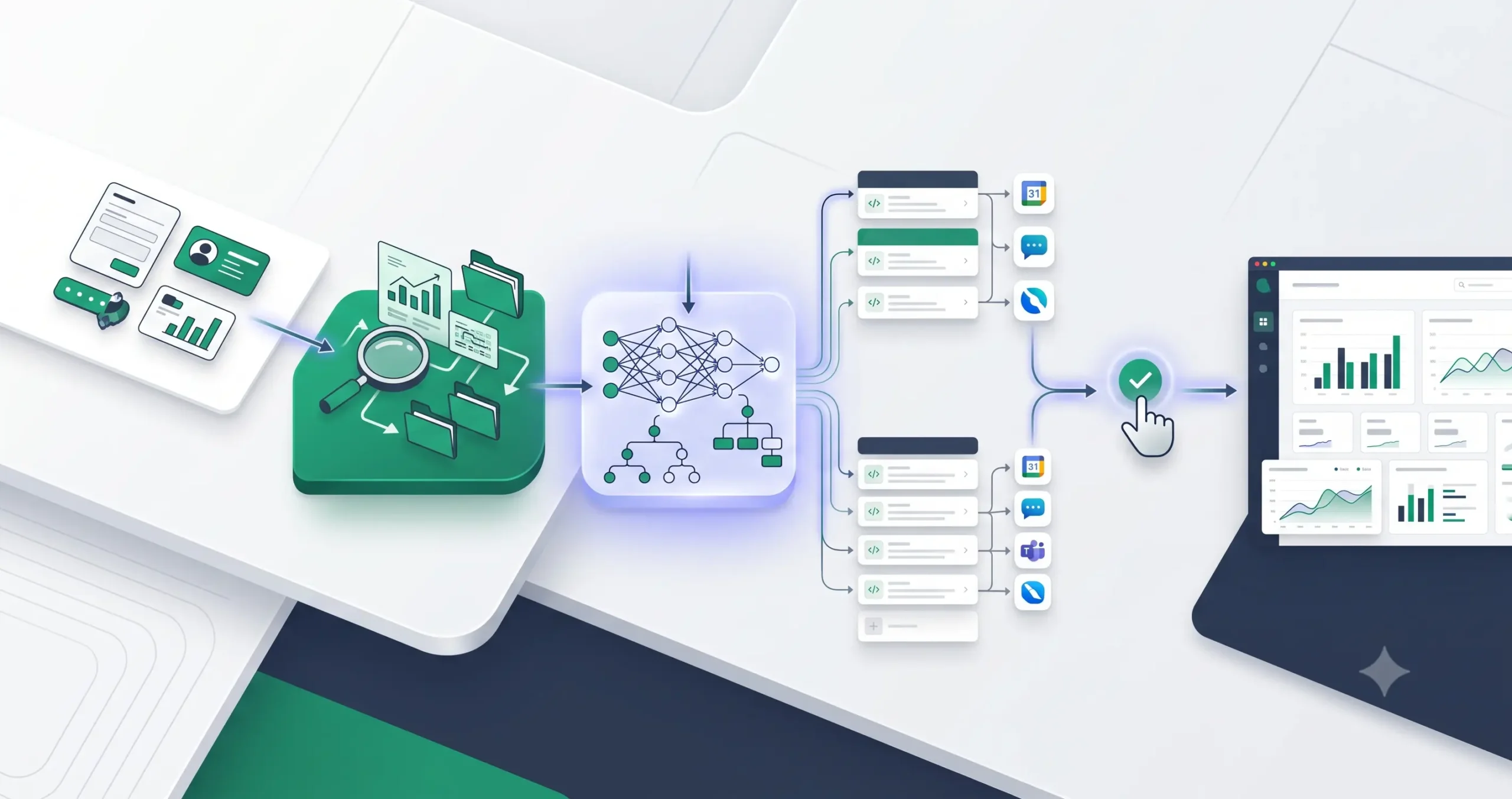
An AI automation agency helps a business turn repetitive work into structured workflows powered by automation tools, AI models, app integrations, and human review. That sounds simple, but the phrase is often used loosely. Some people use it to describe prompt-writing services. Others use it for no-code automation, AI agents, CRM setup, or full operations consulting.
A serious AI automation agency is not just “someone who knows ChatGPT.” It should understand business processes, data flow, software integrations, error handling, privacy, and measurable outcomes. The real value is not the AI itself. The value is designing a workflow that saves time without creating new operational risk.
This guide explains what an AI automation agency actually does, common services, workflow examples, risks, red flags, and how to decide whether to hire one or build your first automation internally.
What Is an AI Automation Agency?
An AI automation agency is a service provider that designs, builds, and maintains AI-assisted workflows for businesses. These workflows usually connect business apps, collect data, use AI to classify or generate information, trigger follow-up actions, and keep humans involved where judgment or approval is needed.
For example, a small business might receive leads from a website form. Before automation, someone manually checks the form, copies the information into a CRM, decides whether the lead is qualified, writes a follow-up message, and alerts the sales team. An AI automation agency could redesign that process so the form triggers an automated workflow, enriches the lead data, uses AI to classify intent, updates the CRM, creates a suggested response, and sends the sales team a notification for review.
That is different from a basic AI consultant. A consultant may advise the company on AI strategy. An AI automation agency should go further by implementing the workflow, testing it, documenting it, and improving it after launch.
If you are new to the broader concept, start with TakeYourAI’s AI automation guides before choosing a tool stack or hiring an implementation partner.
What Does an AI Automation Agency Actually Do?
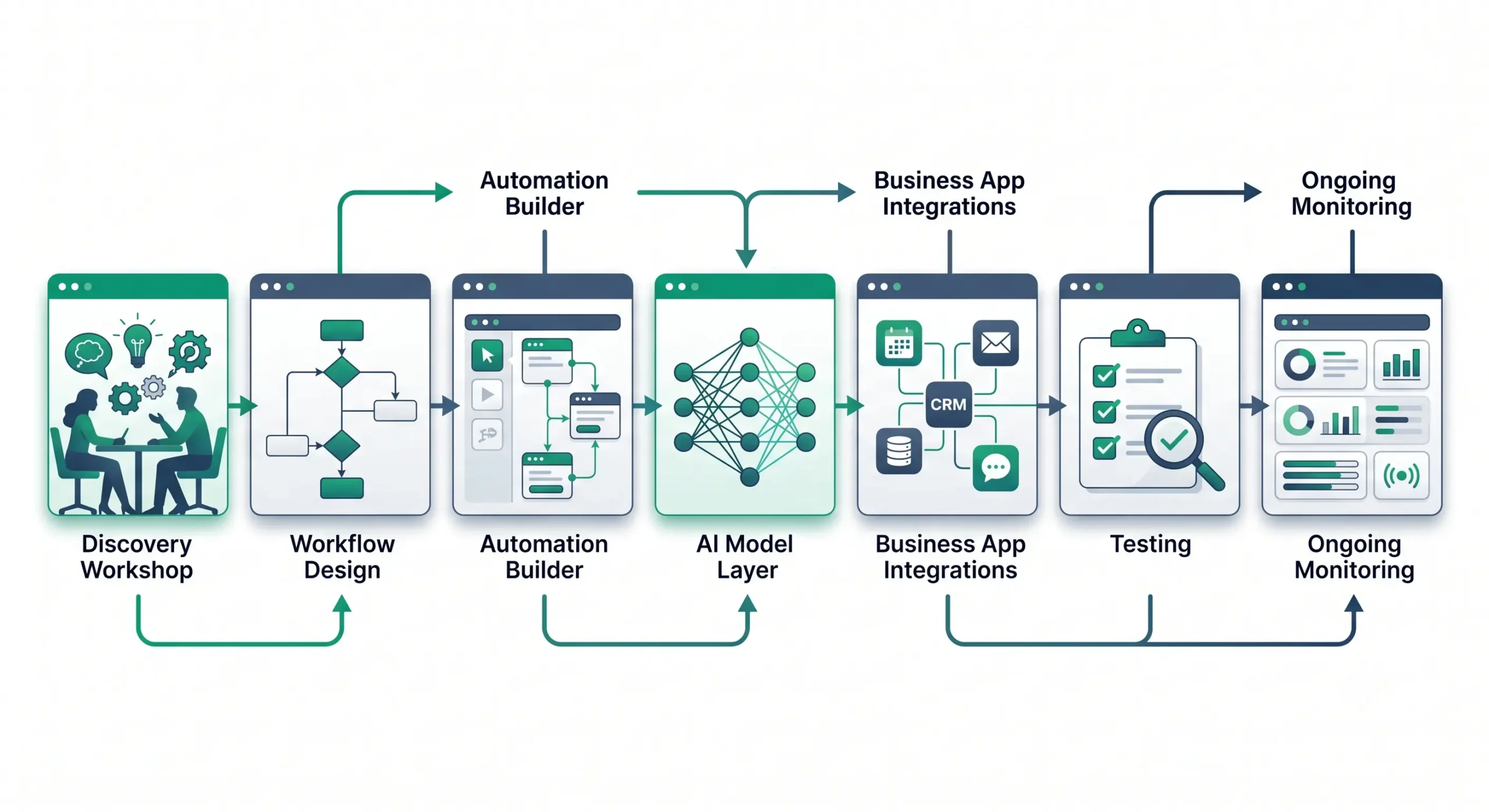
The best way to understand an AI automation agency is to look at the work behind the deliverable. A finished automation might look like a simple workflow in Zapier, Make, n8n, or a custom app. But the useful part usually happens before and after the workflow is built.
1. Process discovery
The agency first identifies how the business currently works. This includes triggers, handoffs, manual steps, approval points, software tools, data sources, and recurring bottlenecks. Without this step, automation becomes guesswork.
For example, “automate customer support” is too broad. A better process discovery question is: “Which support tickets can be safely classified, routed, summarized, or drafted before a human replies?”
2. Workflow design
After discovery, the agency maps the future workflow. A useful workflow design should show what triggers the automation, what data is required, which system receives the output, where AI is used, where humans review the result, and what happens when something fails.
This is where many weak AI agency offers fail. They sell “AI agents” before defining the business process. A serious implementation starts with the workflow, not the buzzword.
3. Tool integration
Most AI automation work involves connecting existing business tools. These may include a CRM, email platform, form builder, project management app, help desk, spreadsheet, database, calendar, or internal knowledge base.
The integration layer matters because AI output only becomes useful when it reaches the right system at the right time. A lead score is not very useful if it never reaches the CRM. A support summary is not useful if the support agent cannot see it before replying.
4. AI model or agent configuration
The agency may configure AI models, AI agents, prompts, tool calls, structured outputs, and retrieval from internal documents. In more advanced projects, the AI system may call external tools or APIs to complete part of the workflow.
This step should be handled carefully. AI should not be placed in every part of the workflow. Use AI where judgment, classification, summarization, extraction, or flexible language generation is needed. Use deterministic automation where the rules are predictable.
5. Testing and quality control
Before launch, the workflow should be tested with realistic examples. Good testing checks normal cases, edge cases, missing data, bad inputs, duplicate records, API errors, and incorrect AI outputs.
This is especially important when the workflow affects customers, sales, support, compliance, or money. A workflow that works once during a demo is not the same as a workflow that works reliably every week.
6. Monitoring and optimization
AI automation is not a one-time setup. Apps change, APIs change, business rules change, and AI outputs need review. A strong agency should provide documentation, ownership details, monitoring logic, and a plan for maintenance.
Common AI Automation Agency Services
AI automation agency services vary, but most useful offers fall into a few operational categories. The best services are tied to a clear business function, not a vague promise to “use AI.”
| Service | What It Automates | Typical Business Value |
|---|---|---|
| Lead qualification | Form intake, lead scoring, CRM updates, sales alerts | Faster response time and better prioritization |
| Customer support triage | Ticket classification, urgency detection, draft replies, routing | Lower manual sorting and faster support handling |
| Sales follow-up automation | Meeting notes, CRM fields, suggested next steps, email drafts | More consistent follow-up after calls or demos |
| Content operations | Brief creation, content repurposing, review queues, publishing tasks | More organized content production with human approval |
| Internal reporting | Data collection, summaries, weekly updates, anomaly notes | Less manual reporting and better visibility |
| Knowledge base assistants | Internal Q&A, document lookup, onboarding support | Faster access to company knowledge |
For small businesses, the best starting point is usually one repetitive process with measurable pain. That might be lead routing, support triage, reporting, onboarding, invoice follow-up, or content workflow coordination. You can explore related examples in TakeYourAI’s guide to AI automation for small business.
How an AI Automation Workflow Works
A practical AI automation workflow has more structure than a single prompt. It usually includes a trigger, input data, an AI step, an automation action, a human review point, and logging.
Example: lead qualification workflow
Imagine a B2B service company receives website inquiries. Before automation, every lead waits until a team member manually reviews the message. A better workflow could look like this:
- Trigger: A new inquiry is submitted through the website form.
- Input data: The workflow collects name, email, company, budget range, service interest, and message text.
- AI step: AI classifies the lead by intent, urgency, fit, and missing information.
- Automation action: The CRM is updated, a task is created, and the sales team receives a notification.
- Human review: A team member approves or edits the suggested follow-up message.
- Logging: The workflow records lead source, classification, response time, and outcome.
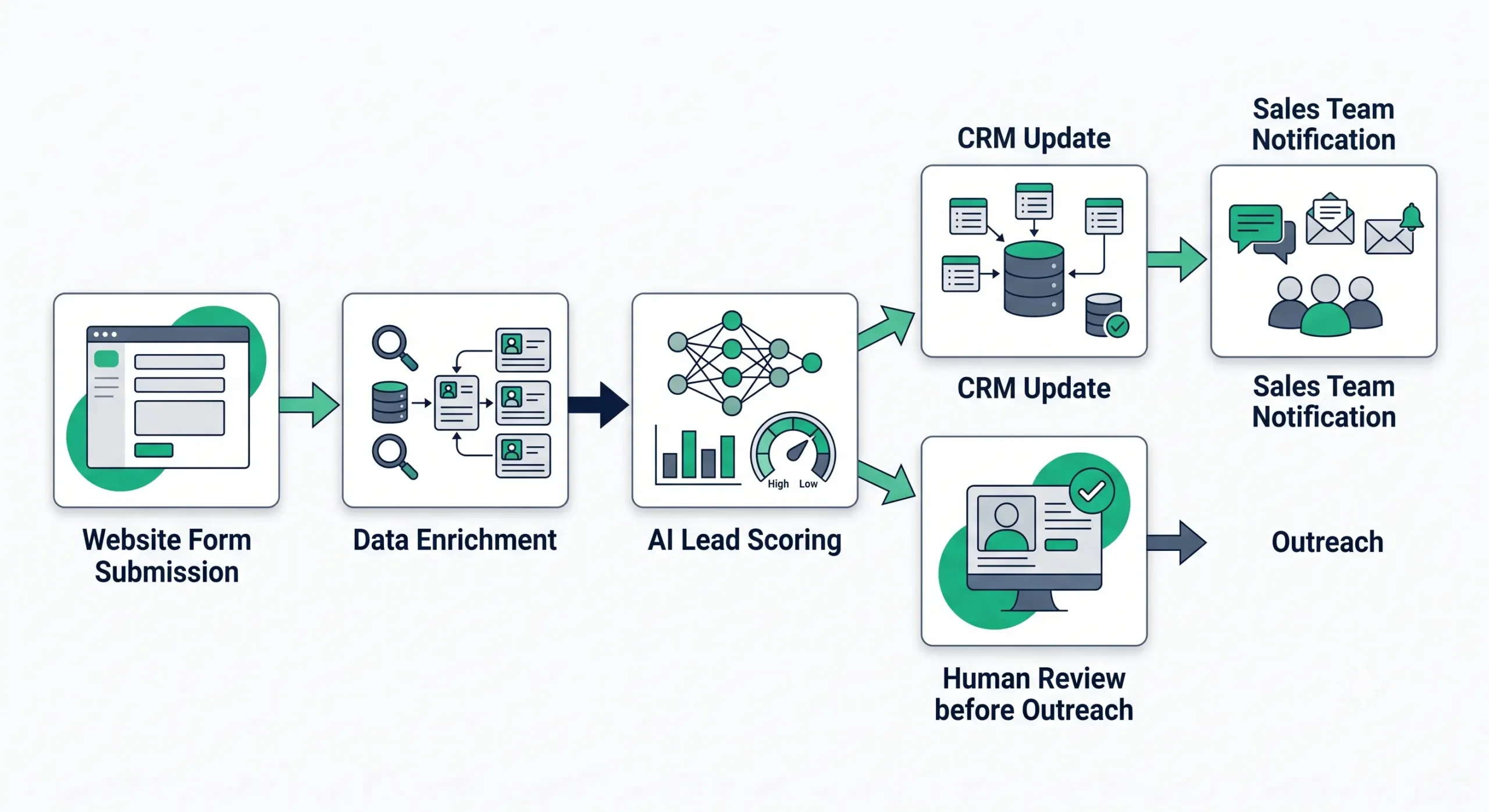
This is where the difference between AI and automation matters. The automation moves data and triggers actions. The AI helps interpret messy human input, such as a free-text message from a prospect. The human still reviews the important output before a customer-facing action is taken.
For more examples like this, use TakeYourAI’s guide to practical AI automation workflows.
Before and after
| Before Automation | After AI-Assisted Automation |
|---|---|
| Leads wait in inboxes or spreadsheets | New leads are routed into a structured workflow |
| Team members manually judge lead quality | AI suggests classification and priority |
| CRM updates are inconsistent | CRM fields are updated automatically |
| Follow-up depends on memory and availability | Suggested next actions are created quickly |
| No clear log of what happened | The workflow records actions and outcomes |
AI Automation Agency vs AI Agency vs Automation Agency
The terms sound similar, but they do not always mean the same thing. The difference matters when you are hiring help or positioning your own service.
| Type | Main Focus | Typical Deliverables | Best Fit |
|---|---|---|---|
| AI agency | Broad AI strategy, tools, content, chatbots, or consulting | AI strategy, prompt systems, chatbots, content workflows, training | Businesses exploring AI but not yet clear on workflows |
| Automation agency | Connecting apps and automating predictable tasks | Zapier, Make, n8n, CRM automations, notifications, data sync | Businesses with clear repetitive processes |
| AI automation agency | Combining AI judgment with workflow automation | AI-assisted workflows, agents, integrations, review systems, monitoring | Businesses that need automation plus classification, summarization, or decision support |
An AI automation agency sits between strategy and execution. It should be able to understand the business process, choose where AI belongs, connect the tools, and reduce risk with testing and review.
Tools an AI Automation Agency Might Use
The exact tool stack depends on the client, budget, technical requirements, data sensitivity, and internal systems. Do not choose an agency only because it uses a popular tool. Choose it because it can explain why the tool fits the workflow.
Automation platforms
Common automation platforms include Zapier, Make, and n8n. Zapier’s agent-focused product connects AI agents with business data and app actions across a large app ecosystem through Zapier Agents. Make positions its platform around visual AI workflow automation, including AI workflows and agentic automation through Make AI automation. n8n provides an AI Agent node for building agent behavior inside workflows.
If your main decision is tool selection, do not turn this article into a full tool comparison. Use TakeYourAI’s tool comparisons, including n8n vs Zapier and n8n vs Make, to compare platforms in more detail.
AI models, APIs, and agent frameworks
Advanced workflows may use AI models through APIs. OpenAI’s Agents SDK is designed for building agentic workflows with tools, handoffs, approvals, and tracing. Anthropic’s tool use documentation explains how Claude can call defined tools or Anthropic-provided tools based on the request and tool description.
These capabilities matter when a workflow needs more than a single generated answer. For example, an AI system may need to read a request, decide what data is missing, call a CRM tool, create a draft response, and wait for approval before sending anything.
CRM and business systems
Many AI automation workflows are only useful if they connect to the company’s CRM, help desk, project management system, email platform, or reporting tools. HubSpot, for example, describes Breeze Agents as AI agents for marketing, sales, and service tasks inside its customer platform.
The key question is not whether a tool includes AI. The key question is whether the workflow fits the business system where the team already works.
Should You Hire an AI Automation Agency or Build It Yourself?
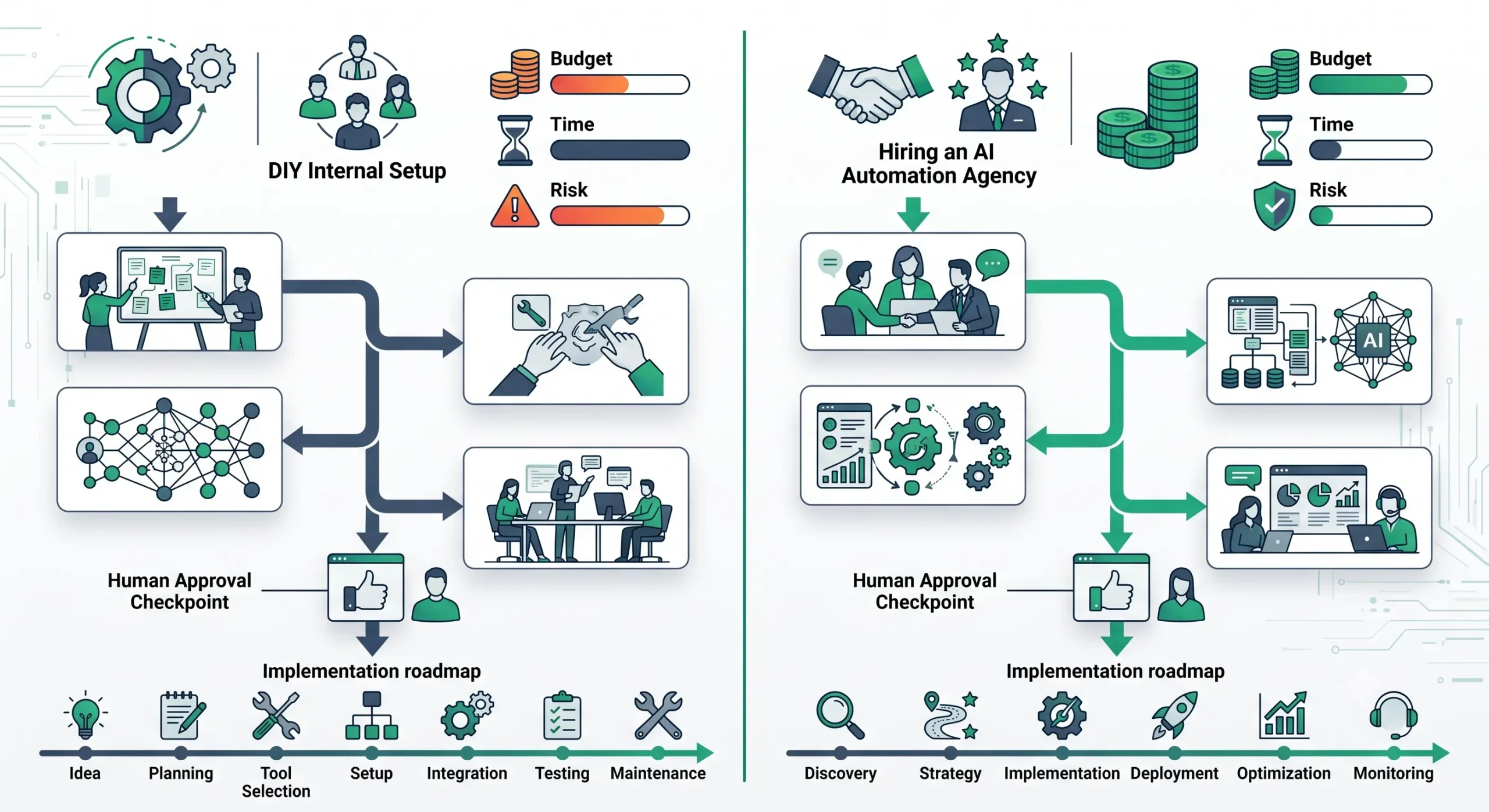
Not every business needs an agency. A simple workflow can often be built internally with a no-code automation tool and a clear process map. Hiring makes more sense when the workflow touches multiple systems, affects customers, requires security review, or needs ongoing maintenance.
| Situation | DIY May Be Enough | Hire an Agency When |
|---|---|---|
| Workflow complexity | One trigger and one or two simple actions | Multiple apps, branches, conditions, and approval points |
| Business risk | Internal-only workflow with low consequences | Customer-facing, financial, legal, health, or compliance-sensitive workflow |
| Internal skill | Your team can map, build, test, and maintain automations | Your team lacks technical or operational automation experience |
| Timeline | You can experiment slowly | You need a production-ready workflow quickly |
| Maintenance | The workflow is simple and rarely changes | The workflow needs monitoring, documentation, and updates |
A good rule: build internally when the risk is low and the process is simple. Hire help when the workflow is important enough that failure would cost real time, money, customer trust, or compliance exposure.
Risks and Red Flags
AI automation can be useful, but it also creates failure modes that normal automation does not. The main risk is not that AI exists in the workflow. The risk is using AI without enough boundaries, testing, and review.
Red flag 1: promises of fully autonomous business operations
Be cautious with any agency that promises to replace entire teams or run critical workflows without oversight. Some workflows can be highly automated, but most business processes still need review rules, escalation paths, and error handling.
Red flag 2: no human review plan
Human review is not a weakness. It is often the control that makes AI automation safe enough to use. Customer messages, sales responses, legal-sensitive content, medical or financial claims, and high-value decisions should not be fully delegated without careful controls.
Red flag 3: no testing method
If the agency cannot explain how it tests the workflow, that is a serious warning sign. Testing should include normal examples, messy examples, missing data, duplicate inputs, tool failures, and incorrect AI responses.
Red flag 4: vague data privacy answers
AI workflows may process customer data, internal documents, support tickets, lead information, or sales records. The agency should explain what data is sent where, which tools process it, who has access, how long data is retained, and what security settings are used.
Red flag 5: unsupported income or ROI claims
Be skeptical of agencies that promise guaranteed revenue, passive income, or massive savings without evidence. The FTC maintains AI-related business guidance and enforcement resources through its artificial intelligence resource page, and businesses should be careful with exaggerated AI claims.
Red flag 6: no documentation or ownership transfer
A working automation is not enough. The client should know where the workflow lives, which accounts it uses, what each step does, how errors are handled, and what happens if the agency relationship ends.
| Risk | What to Ask | Good Answer Looks Like |
|---|---|---|
| AI hallucination | How do you prevent incorrect outputs from reaching customers? | Review steps, confidence thresholds, fallback paths, and logs |
| Broken automations | How do you monitor workflow failures? | Error alerts, logs, retry logic, and maintenance agreement |
| Data privacy | What data is sent to each tool? | Clear data flow map and privacy review |
| Tool lock-in | Who owns the workflow and accounts? | Client-owned accounts, documentation, and export plan |
| Unclear ROI | How will success be measured? | Defined metric such as time saved, response time, error reduction, or conversion lift |
How to Evaluate an AI Automation Agency
When evaluating an AI automation agency, ask questions that force the agency to explain process, ownership, and risk. Avoid judging only by website design, screenshots, or bold claims.
Ask for a workflow map
The agency should be able to show the proposed workflow in plain language. You should understand the trigger, data inputs, AI steps, app actions, review points, and failure paths before anything is built.
Ask why AI is needed
Not every automation needs AI. If a rule-based workflow can solve the problem, that may be cheaper, safer, and easier to maintain. AI should be used where flexible judgment or language handling is genuinely useful.
Ask about the tool stack
The agency should explain why it recommends Zapier, Make, n8n, a custom backend, a CRM-native automation feature, or an AI API. “Because it is popular” is not enough.
Ask about human review
For customer-facing work, ask exactly where humans approve, edit, reject, or escalate the output. If the agency removes all human review from a sensitive workflow, it should have a strong reason and strong safeguards.
Ask about maintenance
Automations can break when fields change, APIs update, tools disconnect, or business rules evolve. A good agency should offer monitoring, maintenance, or at least clear documentation so your team can maintain the workflow.
Ask what you will own
You should know whether the automation lives in your accounts or the agency’s accounts, who owns the documentation, who can edit the workflow, and how you can transfer or shut down the system later.
How to Start Small With AI Automation
You do not need to automate the entire business at once. The safest path is to start with one workflow that is repetitive, measurable, and not too risky.
- Choose one process: Pick a workflow that happens often and wastes visible time.
- Map the current version: Write down every step, tool, handoff, and decision point.
- Define the success metric: Choose one metric such as response time, manual hours saved, fewer missed leads, or faster ticket routing.
- Separate rules from judgment: Use normal automation for predictable steps and AI only where flexible interpretation is needed.
- Add human review: Keep approval in the loop until the workflow proves reliable.
- Test with real examples: Use messy, incomplete, and edge-case inputs, not only perfect demo data.
- Document the system: Record what each step does, which tools are connected, and how to fix common failures.
If you want to build before hiring, start from TakeYourAI’s workflow templates. If you are still choosing the right software, review the best AI automation tools for small business before committing to a stack.
Final Take: The Best AI Automation Agencies Sell Better Operations, Not Magic
An AI automation agency is useful when it helps a business turn messy, repetitive work into a clearer workflow. The strongest agencies do not sell AI as magic. They sell process clarity, practical implementation, safer automation, documentation, and measurable improvement.
For a small business, the best first project is usually not a fully autonomous AI agent. It is a controlled workflow that removes manual handoffs, improves response time, reduces repetitive work, and keeps humans involved where judgment matters.
If you are evaluating an agency, ask for the workflow map before the tool stack. If you are starting an agency, learn to sell operational outcomes before selling AI buzzwords. In both cases, the real advantage comes from building workflows that people can trust, monitor, and improve.
FAQ
What is an AI automation agency?
An AI automation agency designs, builds, and maintains workflows that combine automation tools, AI models, app integrations, and human review. Its goal is to reduce repetitive work while keeping the business process reliable and measurable.
What services does an AI automation agency provide?
Common services include lead qualification, CRM automation, customer support triage, sales follow-up workflows, content operations, internal reporting, and knowledge base assistants.
Is an AI automation agency the same as an AI consultant?
Not exactly. An AI consultant may focus on strategy, recommendations, or training. An AI automation agency should also implement workflows, connect tools, test the system, document it, and support it after launch.
What tools do AI automation agencies use?
They may use automation platforms such as Zapier, Make, or n8n, AI APIs such as OpenAI or Anthropic, and business systems such as CRMs, help desks, email tools, databases, and project management apps.
Can I start an AI automation agency without coding?
You can start with no-code and low-code tools, but you still need process mapping, automation logic, testing, privacy awareness, and client communication skills. Coding becomes more useful when workflows require custom APIs, databases, or advanced integrations.
Should a small business hire an AI automation agency?
A small business should consider hiring one when the workflow is important, touches multiple systems, affects customers, or requires reliable setup and maintenance. Simple internal workflows can often be built in-house first.
What are the biggest risks of AI automation?
The biggest risks include incorrect AI outputs, broken integrations, weak data privacy, lack of human review, unclear ownership, and unsupported ROI claims. These risks can be reduced with testing, documentation, monitoring, and approval steps.