AI Agent Workflow Template for Small Businesses
An AI agent workflow template helps small businesses design controlled agentic workflows that can understand a request, retrieve context, choose tools, perform limited actions, validate the result, and route sensitive steps to human approval. Instead of treating an AI agent as a vague “do everything” assistant, this template breaks the workflow into practical business stages.
The safest AI agent workflows are not fully autonomous from day one. They are designed with clear goals, limited permissions, tool boundaries, validation rules, action logs, and approval gates. That makes them much more useful for real small business operations such as sales follow-up, CRM updates, support triage, reporting, document processing, and task coordination.
In this guide, you will learn how to build a practical AI agent workflow, what inputs it needs, which actions can be automated safely, where human review is required, and how to test the workflow before using it in production. If you are new to automation, start with our AI automation for small business guide, then explore the full TakeYourAI workflow templates library.
Quick answer: Use this AI agent workflow template when you want an AI system to handle a business request, retrieve context, choose tools, perform a limited action, and produce a result under clear guardrails. Keep human approval for sending messages, changing records, deleting data, making financial decisions, or taking any action that could affect customers, revenue, compliance, or trust.
What This AI Agent Workflow Template Does
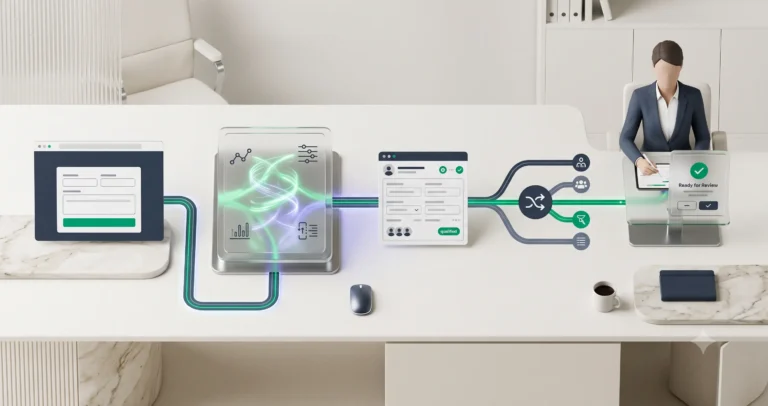
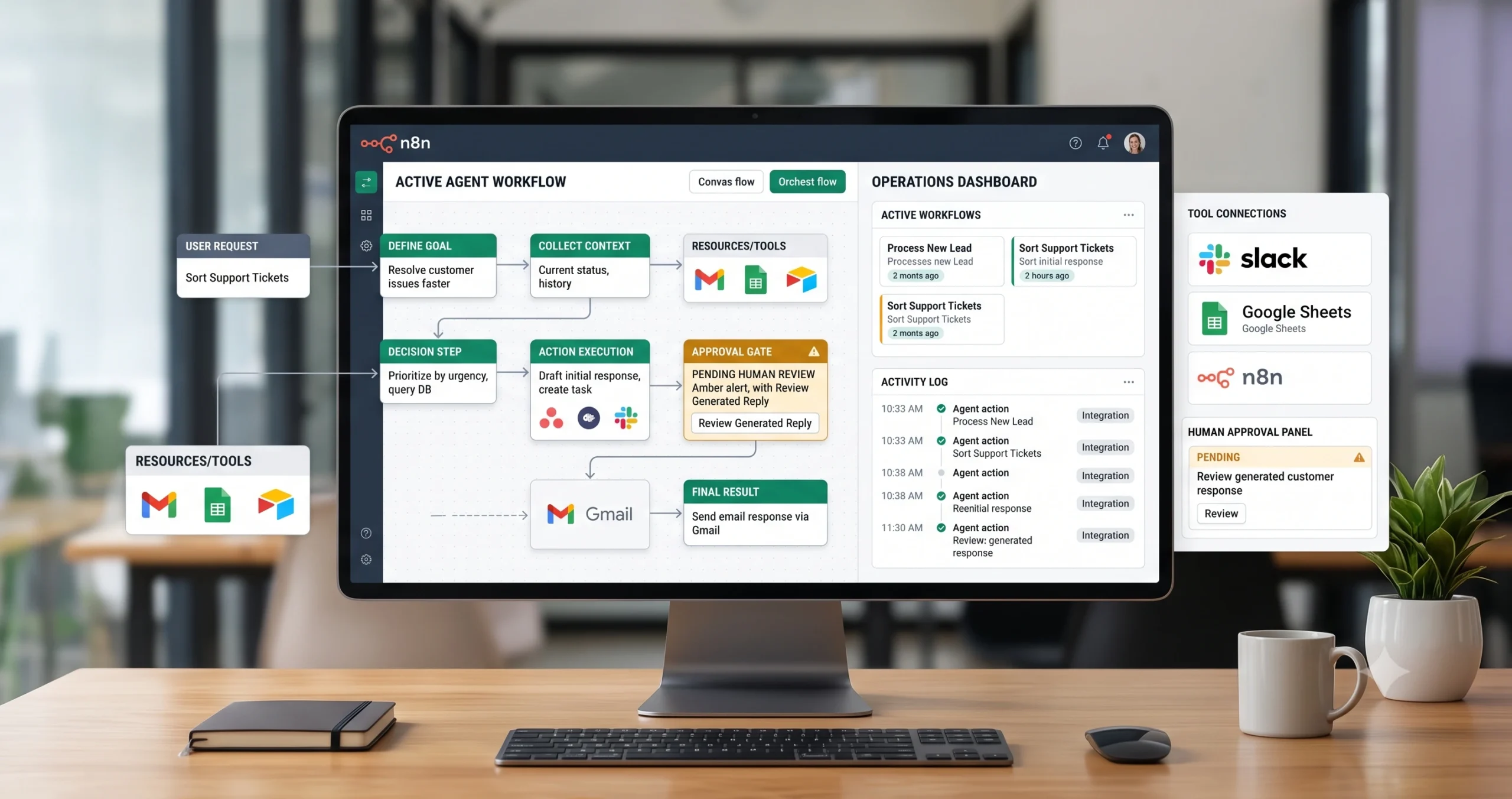
This template gives you the workflow logic for building a controlled AI agent system. The agent receives a request or trigger, understands the goal, retrieves relevant context, selects approved tools, proposes or performs an action, validates the result, and sends risky steps to a human before completion.
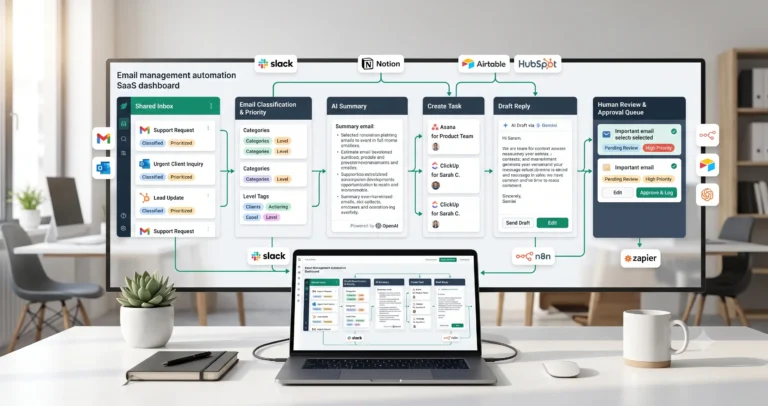
A simple version of this workflow can summarize a request, search a knowledge base, draft a response, create a task, or prepare an update for review. A more advanced version can connect to a CRM, spreadsheet, email inbox, project tool, support system, document folder, or reporting workflow.
| Agent job | Example | Why it helps |
|---|---|---|
| Understand a request | Classify whether the user is asking for support, follow-up, research, reporting, or a task update. | Routes work into the correct business path. |
| Retrieve context | Pull related CRM notes, customer history, document data, or previous task details. | Gives the agent enough context to act usefully. |
| Select tools | Choose whether to use email, CRM, Slack, spreadsheet, project management, or document storage. | Prevents random tool use and keeps actions controlled. |
| Perform limited actions | Create a task, draft an email, update a low-risk field, or prepare a report summary. | Reduces repetitive manual work. |
| Validate result | Check whether the action follows rules, has enough context, and avoids risky assumptions. | Improves reliability before output is used. |
| Route for review | Send sensitive, uncertain, or high-impact actions to a human for approval. | Protects customers, data quality, and business trust. |
Who Should Use It?
This AI agent workflow template is useful for small businesses that want AI to do more than generate text, but still need control over what the system can access, change, send, or approve.
- Agencies that want AI to prepare client updates, tasks, and internal summaries.
- Consultants who want an agent to organize notes, draft follow-ups, and update project records.
- SaaS teams that want AI to triage support, summarize usage signals, and prepare customer actions.
- Sales teams that want AI to review lead context, draft follow-ups, and prepare CRM updates.
- Operations teams that want AI to coordinate documents, reports, tasks, and notifications.
- Founders who want a controlled assistant for recurring admin workflows.
This template is especially useful after you already have simpler workflows in place, such as AI lead qualification, CRM update automation, document processing automation, or weekly AI reporting automation.
Workflow Overview
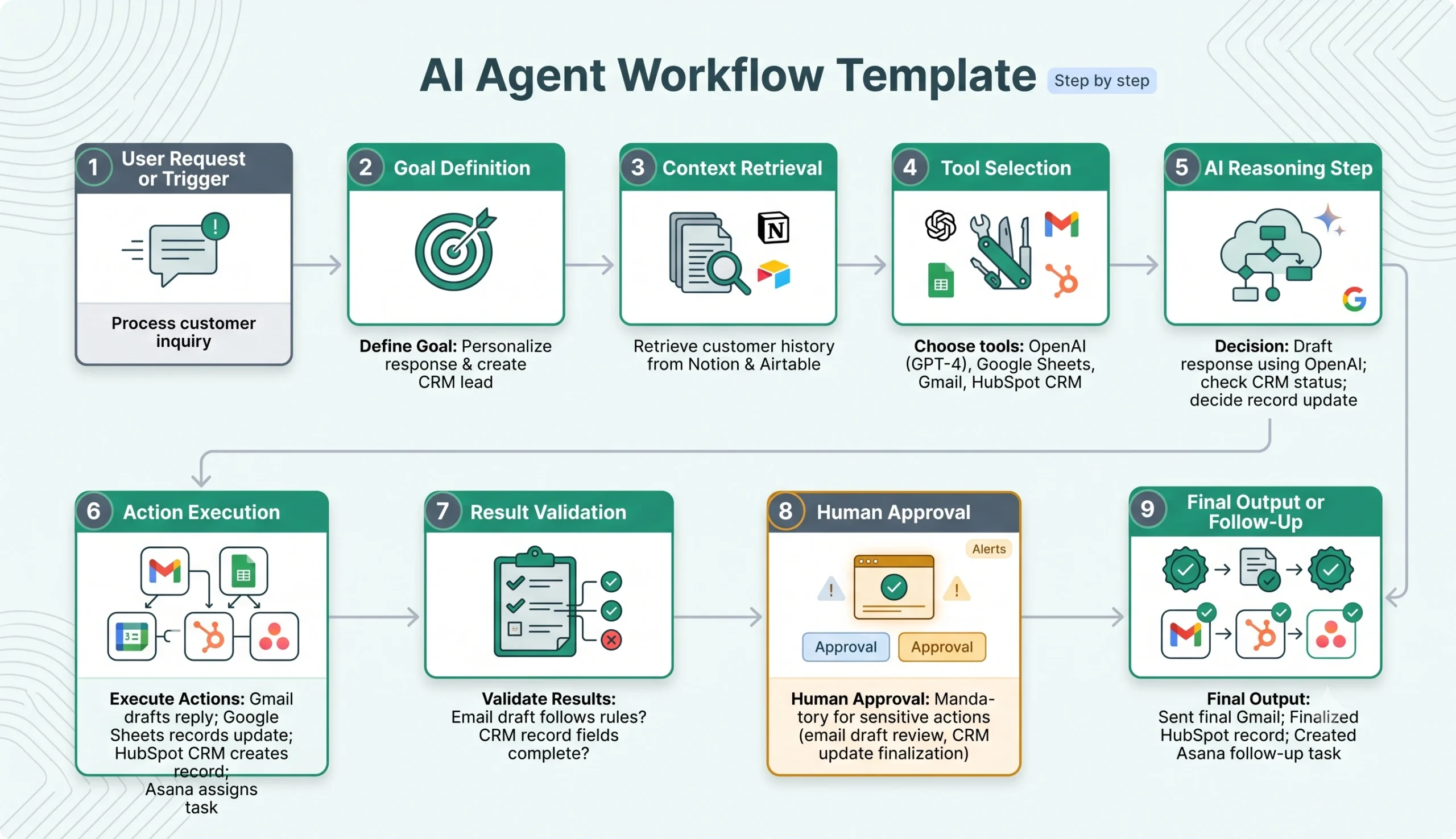
A reliable AI agent workflow has nine core parts: trigger, goal definition, context retrieval, tool selection, reasoning, action execution, result validation, human approval, and final output.
| Workflow step | What happens | Output |
|---|---|---|
| User request or trigger | The workflow starts from a form, message, email, schedule, CRM event, or manual command. | A clear request enters the system. |
| Goal definition | The workflow identifies what the agent is allowed to accomplish. | A specific goal is created. |
| Context retrieval | The agent gathers related data from approved sources. | Relevant context is prepared. |
| Tool selection | The agent chooses from approved tools only. | A safe tool path is selected. |
| AI reasoning step | The agent decides the next best action based on the goal, context, and rules. | An action plan is produced. |
| Action execution | The workflow performs a limited action such as drafting, updating, creating, or notifying. | A business action is completed or prepared. |
| Result validation | The result is checked against business rules and safety limits. | Errors or risky outputs are flagged. |
| Human approval | Sensitive actions are reviewed before final execution. | Approved, corrected, or rejected action. |
| Final output | The result is saved, sent, assigned, or logged. | The workflow completes with an audit trail. |
How the AI Agent Workflow Works
The workflow should begin with a narrow business goal. Do not start by giving an AI agent broad access to your tools and asking it to “manage operations.” Start with one controlled use case, such as drafting follow-up emails, preparing CRM updates, summarizing documents, creating internal tasks, or routing support requests.
After the trigger starts the workflow, the agent receives the goal and retrieves only the context it is allowed to use. Then it selects an approved tool, performs or prepares a limited action, validates the output, and sends risky steps to human review.
Step 1: Start from a clear trigger
The trigger can be a user request, support ticket, CRM event, document upload, email, spreadsheet row, Slack message, or scheduled task. The trigger should be specific enough to decide what kind of workflow is needed.
Step 2: Define the goal
The agent needs a clear goal, such as “draft a follow-up email,” “summarize this client file,” “prepare a CRM update,” or “create a task for review.” A vague goal creates unpredictable actions.
Step 3: Retrieve approved context
The workflow should retrieve only the information needed for the task. That may include CRM notes, previous emails, document text, support history, spreadsheet data, project records, or a knowledge base entry.
Step 4: Choose from approved tools
Tool access should be limited. The agent should only use tools that are approved for the workflow, such as a CRM search action, email draft action, spreadsheet lookup, Slack notification, or project task creation.
Step 5: Generate an action plan
Before taking action, the agent should produce a short plan. The plan should explain what it intends to do, which source data it used, which tool it will call, and whether human approval is required.
Step 6: Execute only allowed actions
Low-risk actions can run automatically after testing. High-risk actions should remain drafts or approval requests. For example, creating an internal task is safer than sending a customer email. Drafting a CRM note is safer than changing deal stage automatically.
Step 7: Validate and log the result
The workflow should check the result, store an action log, and notify a human if the agent output is missing context, violates rules, or requires approval.
Required Inputs
AI agent workflows become more reliable when the system receives clear goals, controlled context, tool permissions, and business rules. Without those inputs, the agent may produce generic outputs or attempt actions that should have required approval.
| Input | Example | Use in workflow |
|---|---|---|
| Trigger | New support ticket, CRM update, uploaded document, Slack request, scheduled report. | Starts the agent workflow. |
| Goal | Draft response, summarize context, update record, create task, prepare report. | Defines what the agent is trying to accomplish. |
| Context sources | CRM, email, spreadsheet, knowledge base, document folder, project tool. | Provides the data needed for a useful action. |
| Allowed tools | Search CRM, draft email, create task, update spreadsheet, send Slack message. | Limits what the agent can access or change. |
| Business rules | Never send customer emails without approval, never delete records, review deal-stage changes. | Controls risk and prevents unsafe automation. |
| Review conditions | Low confidence, missing source, sensitive customer, financial decision, external message. | Decides when human approval is required. |
| Output destination | Email draft, CRM note, task, Slack message, spreadsheet row, internal report. | Determines where the result goes. |
Practical rule: never give an AI agent broad permissions before the workflow is tested. Start with read-only access or draft-only actions, then expand permissions gradually.
AI Agent Permissions and Action Boundaries
Permissions are the most important part of an AI agent workflow. A useful agent does not need unlimited access. It needs the right access for one controlled job.
| Permission level | Example action | Recommended use |
|---|---|---|
| Read-only | Search CRM notes, read a document, inspect a spreadsheet, retrieve support history. | Safest starting point for most workflows. |
| Draft-only | Draft an email, prepare a CRM note, suggest a task, generate a report summary. | Good for workflows that need human approval. |
| Low-risk write | Create an internal task, add a non-sensitive note, update a tracking row. | Allow only after testing and logging. |
| Conditional write | Update a CRM field, send a notification, assign a task owner. | Use with validation rules and review conditions. |
| High-risk action | Send customer emails, delete records, change deal stage, approve payments, merge contacts. | Require human approval. |
For many small businesses, the best first AI agent workflow is not a fully autonomous agent. It is a controlled assistant that prepares work for review. That approach still saves time while reducing the risk of incorrect actions.
AI Agent Prompt Template
Use a controlled prompt that forces the agent to state the goal, use only approved context, choose from allowed tools, and identify whether approval is required.
Copy-paste prompt structure:
You are an AI agent helping a small business complete a controlled workflow. Use only the context and tools provided. Do not invent missing facts. Do not perform actions outside the allowed permissions. If the request is unclear, risky, or missing required context, route it to human review.
Workflow context:
User request or trigger: {{trigger}}
Business goal: {{goal}}
Available context: {{context}}
Approved tools: {{approved_tools}}
Allowed automatic actions: {{allowed_actions}}
Actions requiring approval: {{approval_required_actions}}
Validation rules: {{validation_rules}}
Output destination: {{output_destination}}
Return:
1. Interpreted goal
2. Context used
3. Missing information
4. Selected tool or action
5. Proposed action plan
6. Risk level
7. Whether human approval is required
8. Final draft or action result
9. Action log summary
If your automation platform supports structured outputs, ask the agent to return JSON. That makes it easier to route the result into approval queues, task creation, CRM updates, or notifications.
Validation Rules
Validation rules help prevent the agent from acting on weak context, missing information, or risky assumptions. The workflow should check the result before it is sent, saved, or used to update another system.
| Validation check | What to verify | Recommended action |
|---|---|---|
| Goal clarity | The agent understands exactly what the workflow should accomplish. | Route unclear requests to review. |
| Source context | The result is based on approved data, not invented assumptions. | Require source references or context summary. |
| Tool permission | The selected action is allowed for this workflow. | Block unauthorized actions. |
| Output quality | The final output is complete, accurate, and useful. | Send weak outputs to review. |
| External impact | The action affects customers, partners, vendors, public content, or money. | Require human approval. |
| Data change | The action updates CRM, documents, spreadsheets, or project records. | Allow low-risk updates, review sensitive changes. |
| Action log | The workflow records what the agent did and why. | Log every action for review and debugging. |
Human Review and AI Agent Guardrails
Human review is not a weakness in an AI agent workflow. It is what makes the workflow usable in real business operations. The more an agent can affect customers, records, payments, legal details, or trust, the more important approval becomes.
Start with strong guardrails: define allowed actions, limit tool permissions, require approval for sensitive steps, log every action, and review failed or uncertain outputs.
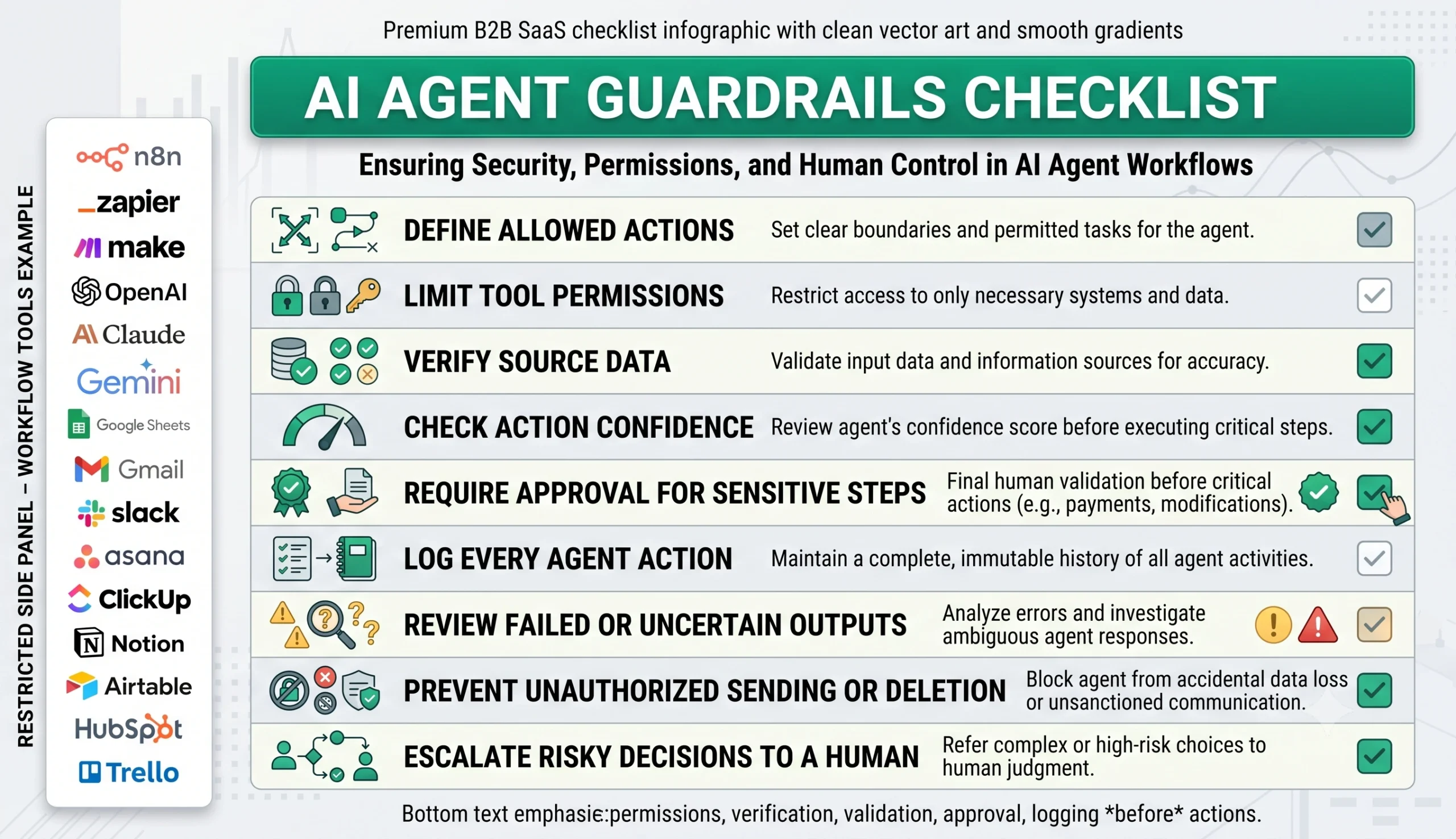
| Action type | Risk level | Recommended rule |
|---|---|---|
| Summarize internal notes | Low | Allow after testing, with source context included. |
| Create internal task | Low to medium | Allow if the task is non-sensitive and easy to correct. |
| Draft customer email | Medium | Save as draft for human review. |
| Update CRM note | Medium | Allow if labeled and logged, but avoid overwriting important fields. |
| Change deal stage | High | Require human approval. |
| Send external message | High | Require approval unless the message is fully standardized and tested. |
| Delete or merge records | High | Do not automate without strict approval and recovery process. |
Testing Checklist
Test this AI agent workflow template with realistic examples before giving it access to live business systems. Include clean requests, vague requests, missing context, sensitive cases, failed tool calls, and actions that should be blocked.
| Test case | What to verify |
|---|---|
| Clear low-risk request | The agent completes the action correctly and logs the result. |
| Missing context | The agent asks for review or marks missing information instead of guessing. |
| Unauthorized tool request | The workflow blocks the action. |
| External email draft | The agent saves a draft instead of sending automatically. |
| CRM update | The agent updates only allowed fields or routes sensitive changes to review. |
| Failed tool call | The workflow logs the failure and notifies a human. |
| Conflicting data | The agent flags the conflict instead of choosing randomly. |
| High-risk action | The workflow requires approval before execution. |
Tools You Can Use
This template is platform-neutral. You can build AI agent workflows with different tools depending on your current stack, technical level, and how much control you need.
| Tool type | Best use | Example options |
|---|---|---|
| AI model | Interprets goals, summarizes context, drafts actions, and produces structured outputs. | OpenAI, Claude, Gemini, or another text-capable model. |
| Workflow builder | Controls triggers, tool calls, routing, validation, and approvals. | n8n, Make, Zapier, or similar automation platforms. |
| Business data source | Provides context for the agent. | CRM, spreadsheet, email, support tool, documents, knowledge base, project tool. |
| Action tool | Lets the workflow create tasks, drafts, updates, or notifications. | Gmail, Slack, HubSpot, Airtable, Notion, Asana, ClickUp, Trello, Google Sheets. |
| Approval channel | Routes sensitive actions to a human. | Email, Slack, project task, CRM task, approval queue, internal dashboard. |
| Logging system | Stores what the agent did and why. | Spreadsheet, database, Notion table, Airtable, workflow execution history. |
If you are still choosing your automation platform, read Best AI Automation Tools for Small Business. For direct comparisons, review n8n vs Zapier, n8n vs Make for AI automation, and Make vs Zapier.
Common Mistakes
AI agent workflows usually fail when the agent is given too much freedom, too little context, or no clear approval rules. The safest approach is to start narrow and expand gradually.
| Mistake | Why it hurts | Better approach |
|---|---|---|
| Giving broad tool access too early | The agent may change, send, or update things before the workflow is reliable. | Start with read-only or draft-only actions. |
| No clear goal | The agent produces vague or unpredictable outputs. | Define one specific business objective per workflow. |
| No context retrieval rules | The agent may respond without enough source data. | Define which sources it can retrieve and when. |
| No approval gate | Risky actions may happen automatically. | Require approval for external, financial, legal, or record-changing actions. |
| No action logging | It becomes hard to debug mistakes or understand what happened. | Log every action, source, tool call, and review decision. |
| Expecting the agent to fix bad processes | AI makes weak operations faster, not necessarily better. | Define the business process before adding the agent layer. |
Simple Implementation Plan
- Choose one business use case. Start with one workflow such as drafting follow-ups, creating tasks, summarizing documents, or preparing CRM updates.
- Define the trigger. Decide what event starts the workflow.
- Write the goal clearly. Define what the agent should accomplish and what it must not do.
- List allowed context sources. Give the agent only the data sources needed for the task.
- Limit tool permissions. Start with read-only or draft-only tools.
- Add validation rules. Check missing context, risk level, allowed actions, and output quality.
- Add approval gates. Require human review for sensitive or external actions.
- Add logging. Record the request, context, selected tool, result, and approval status.
- Test with realistic examples. Include normal requests, edge cases, missing context, and blocked actions.
- Expand slowly. Add more permissions only after the workflow is reliable.
Final Recommendation
Start with an AI agent workflow template that retrieves context, drafts outputs, creates internal tasks, and asks for approval before external or high-impact actions. Avoid giving the first version full write access to your CRM, inbox, documents, or project tools.
Once the agent workflow is stable, connect it to specific workflows such as CRM update automation, document processing automation, client onboarding automation, AI customer support triage, and weekly AI reporting automation.
The best AI agent workflows are not magic assistants. They are controlled business systems with goals, context, permissions, validation, logging, and human review.
FAQ
What is an AI agent workflow template?
An AI agent workflow template is a repeatable process that helps an AI system receive a request, define a goal, retrieve context, select approved tools, perform limited actions, validate the result, and route risky steps to human review.
How is an AI agent different from a normal automation?
A normal automation usually follows fixed rules. An AI agent workflow can interpret context, choose from approved tools, and decide the next step within defined boundaries. It still needs permissions, validation, and review rules.
Should AI agents be allowed to take business actions automatically?
Only low-risk actions should be automated after testing. Sensitive actions such as sending customer emails, changing deal stages, deleting records, merging contacts, or making financial decisions should require human approval.
What is a safe first AI agent workflow for a small business?
A safe first workflow is usually read-only or draft-only. Examples include summarizing customer context, drafting an email, preparing a CRM note, creating an internal task, or generating a report for review.
What tools can I use to build AI agent workflows?
You can combine AI models such as OpenAI, Claude, or Gemini with workflow builders such as n8n, Make, or Zapier and business tools such as CRM systems, spreadsheets, email, Slack, Notion, Asana, ClickUp, or Trello.
What guardrails should an AI agent workflow have?
Important guardrails include limited permissions, approved tools, source context rules, validation checks, human approval for risky actions, error handling, and action logs.