
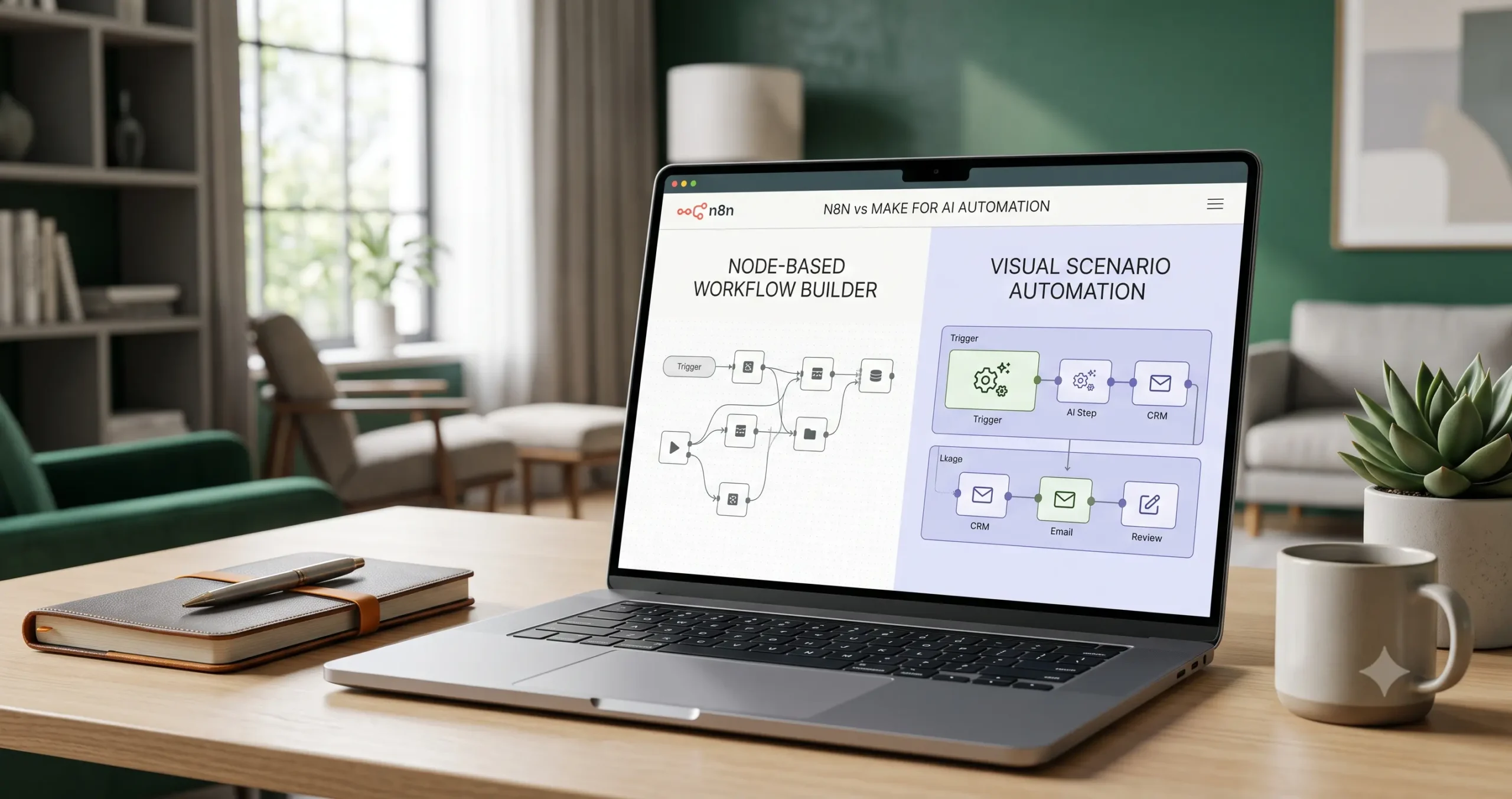
n8n vs Make for AI Automation: Which Workflow Tool Is Better for Small Businesses?
Choosing between n8n vs Make for AI automation is not only a tool comparison. It is a decision about how your small business wants to build, control, maintain, and scale automation workflows.
Make is often easier for visual workflow building and less technical teams. n8n is often stronger for flexible, technical, and deeply customizable workflows. But the better choice depends on your workflow type, team skill level, AI requirements, integrations, data control, and long-term maintenance needs.
If you are still new to AI automation, start with our AI automation for small business guide. If you already understand the basics but need practical use cases, read 15 AI automation workflow examples for small businesses before choosing between n8n and Make.
If you are still choosing your wider automation stack, read Best AI Automation Tools for Small Business before committing to a workflow builder.
If Zapier is also on your shortlist, read our n8n vs Zapier comparison to understand the difference between a simpler app-to-app automation platform and a more technical workflow builder. If your decision is between visual scenario building and simpler trigger-action automation, read Make vs Zapier as well.
Quick Verdict: n8n vs Make
For most small businesses, the decision comes down to this:
- Choose Make if you want a visual automation builder, faster setup, and a friendlier experience for non-technical teams.
- Choose n8n if you want more technical control, advanced workflow logic, self-hosting options, and deeper customization.
Neither tool is automatically better for every business. A small agency, local service company, ecommerce store, SaaS team, or consultant may choose differently depending on how complex the workflow is.
A simple lead notification workflow may be easier to build in Make. A complex workflow involving API calls, custom logic, AI agents, error handling, and private infrastructure may fit n8n better.
What Are n8n and Make?
What Is Make?
Make is a visual automation platform for building scenarios that connect apps, move data, transform information, and trigger actions across business tools.
Its main strength is visual workflow building. You can create scenarios with connected modules, routes, filters, and app actions. For many small businesses, this makes Make easier to understand than more technical automation tools.
Make is useful for workflows such as:
- sending form submissions to a CRM,
- creating support tasks from emails,
- syncing spreadsheets with business apps,
- drafting AI-generated summaries,
- routing leads or customer requests,
- building visual automation systems with branching paths.
Make also provides AI-related features and Make AI Agents, which can be used inside scenarios for more adaptive automation. You can review Make’s official AI Agents documentation here: Make AI Agents documentation.
What Is n8n?
n8n is a workflow automation platform that gives users strong control over workflow logic, app integrations, code steps, APIs, and deployment options.
n8n can be used through n8n Cloud or self-hosted on your own infrastructure. The self-hosted option is one of the reasons technical users and automation-heavy teams often like n8n, but self-hosting also adds responsibility for setup, maintenance, security, and updates.
n8n is useful for workflows such as:
- advanced API-based automations,
- multi-step AI workflows,
- custom data transformations,
- internal operations automations,
- self-hosted automation systems,
- AI agent workflows with connected tools.
n8n has dedicated AI-related nodes, including an AI Agent node and OpenAI-related nodes. You can review the official documentation here: n8n AI Agent node documentation and n8n OpenAI node documentation.
n8n vs Make Comparison Matrix
The fastest way to compare n8n vs Make is to look at the type of workflow you want to build and the kind of team that will maintain it.
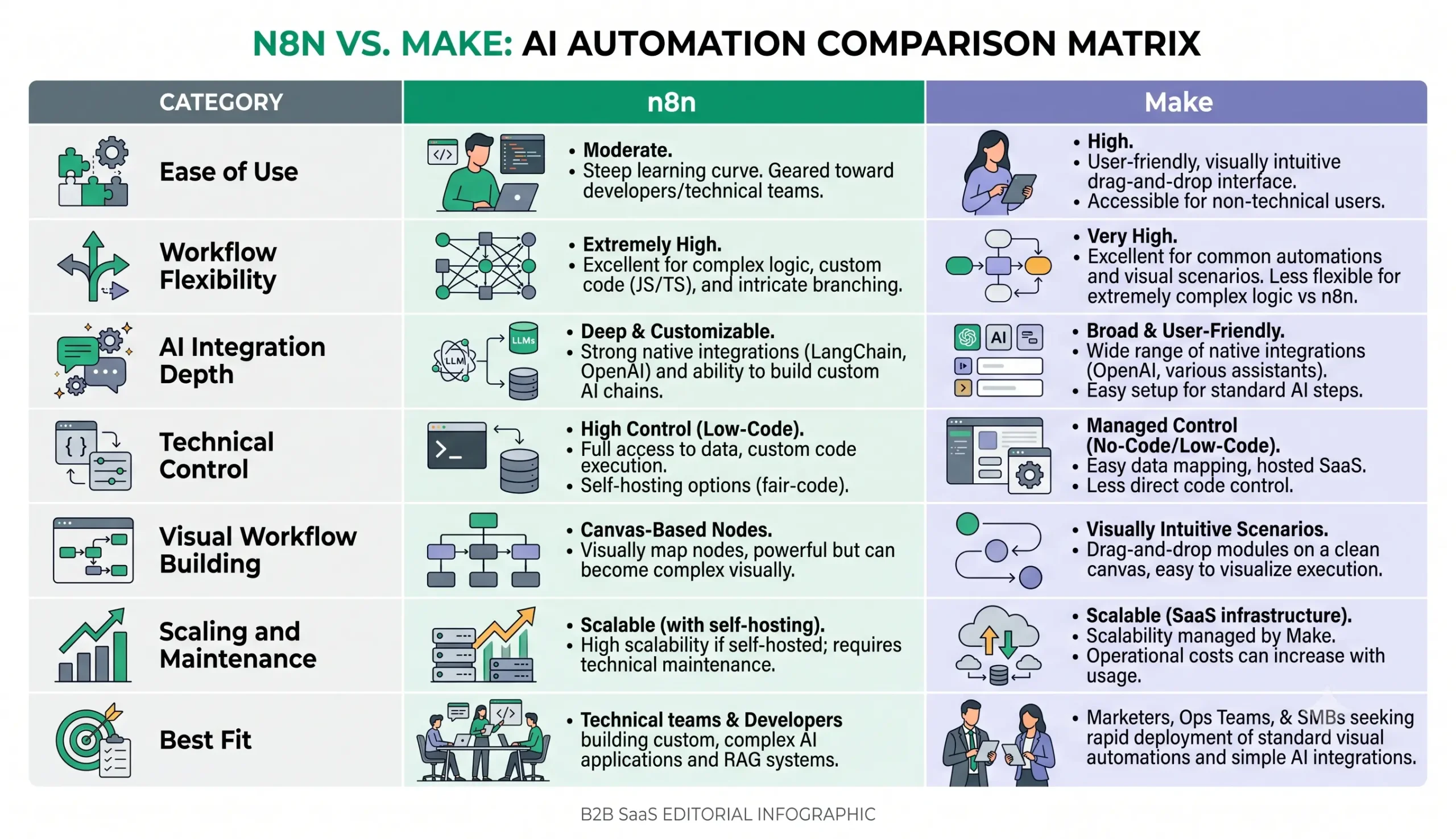
| Category | Make | n8n |
|---|---|---|
| Ease of use | Usually easier for non-technical users and visual builders. | More technical, especially for advanced logic and self-hosting. |
| Workflow style | Visual scenario builder with modules, routes, and filters. | Node-based workflow builder with strong control over logic and data flow. |
| AI automation | Useful for AI-assisted scenarios and Make AI Agents. | Strong for custom AI workflows, AI Agent nodes, API calls, and advanced logic. |
| Technical control | Good for common workflows, but less technical control than n8n. | Stronger technical flexibility, especially for custom workflows. |
| Hosting options | Cloud platform. | Cloud or self-hosted, depending on your setup preference. |
| Best fit | Small teams that want visual automation without deep technical setup. | Technical users, agencies, operators, and teams needing advanced control. |
Ease of Use
Make is usually easier for beginners because its visual scenario builder makes workflows feel more like diagrams. You can see app modules, routes, and data flow in a way that is often easier for business users to understand.
This matters if the person building automations is a founder, marketer, assistant, operations manager, or consultant who does not want to manage servers, write code, or think deeply about infrastructure.
n8n can also be visual, but it tends to feel more technical. It is not necessarily hard, but it rewards users who understand APIs, JSON data, custom logic, credentials, webhooks, and error handling.
Workflow Flexibility
n8n is often stronger when the workflow becomes complex. It gives users more room to build custom logic, connect APIs, transform data, and design workflows that go beyond simple app-to-app automation.
This can matter when your workflow includes:
- multiple conditional paths,
- custom API requests,
- data transformation steps,
- AI model calls,
- database updates,
- human approval logic,
- error handling and retries,
- internal operations systems.
Make can also handle multi-step workflows and branching logic, but n8n may give technical users more control when workflows become highly customized.
AI Automation Capabilities
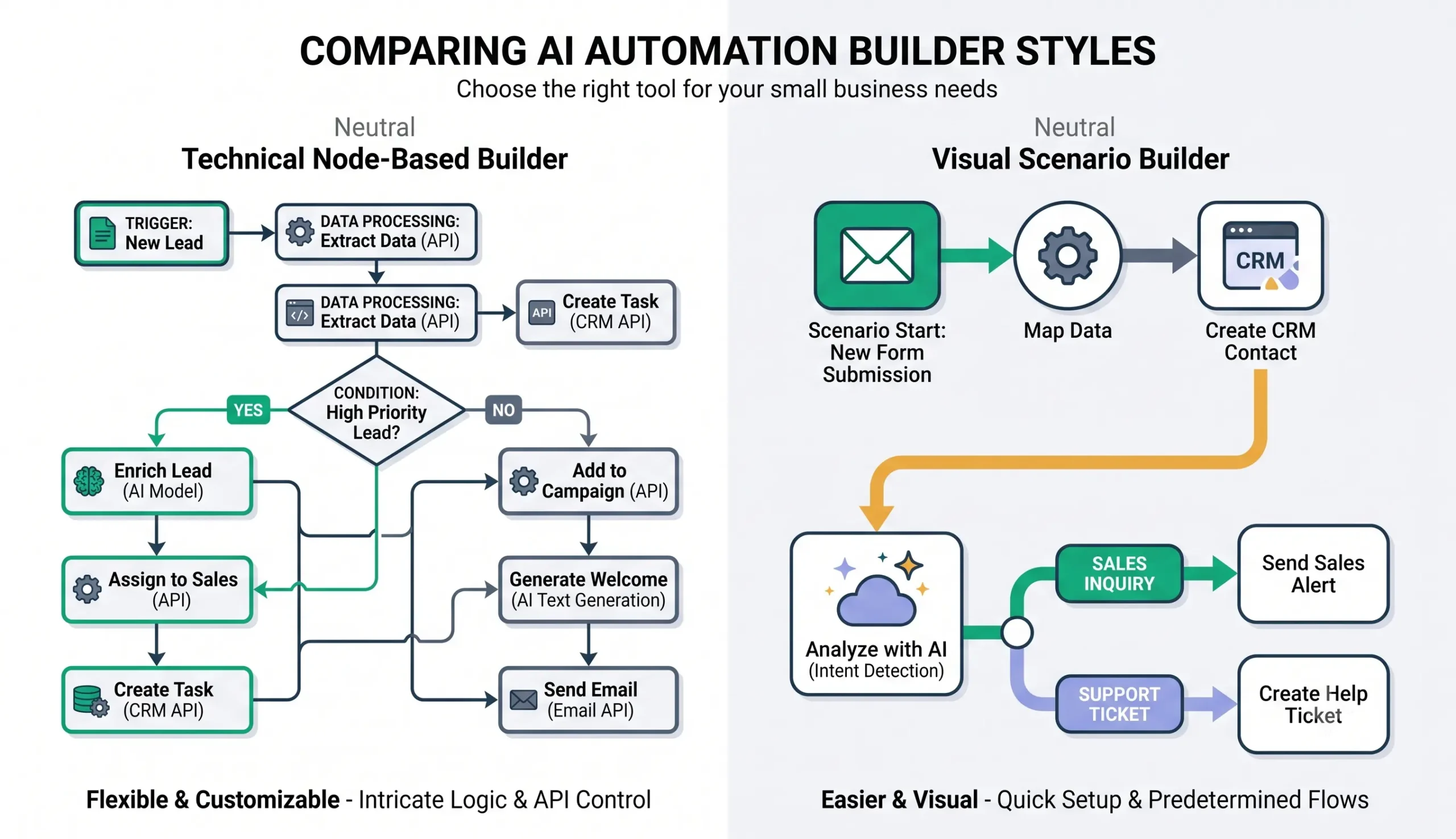
Both n8n and Make can be used for AI automation, but they often fit different styles of AI workflow building.
Make can work well when you want to add AI steps into visual scenarios. For example, a Make scenario can receive a form submission, send the message to an AI model, summarize the request, route the lead, and update a CRM.
n8n can be especially strong when you want deeper AI workflow logic, custom API calls, structured outputs, tool-using AI agents, and more control over how data moves through the automation.
Here are common AI automation tasks both tools can support, depending on your setup and integrations:
- lead scoring and qualification,
- support ticket classification,
- email and message summarization,
- CRM note extraction,
- document data extraction,
- report generation,
- content repurposing,
- AI-assisted routing and decision support.
For real examples of what to automate, see our guide to AI automation workflows for small business.
Control, Hosting, and Data Considerations
Control is one of the biggest differences between n8n and Make.
Make is a cloud automation platform. This is convenient because you do not need to manage hosting, servers, updates, or infrastructure.
n8n gives you more deployment choice. You can use n8n Cloud, or you can self-host n8n if you have the technical knowledge and infrastructure. n8n’s official documentation explains that self-hosting requires technical knowledge, including setup, server configuration, scaling, security, and maintenance.
You can review n8n’s hosting documentation here: n8n hosting documentation.
For many small businesses, cloud tools are easier. For technical teams, agencies, or businesses with stricter control requirements, n8n’s self-hosting option may be attractive.
Pricing Logic and Scaling
Pricing changes over time, so do not choose n8n or Make based only on a screenshot or old comparison table. Always check current pricing pages and usage rules before committing.
Make uses credits as its billing unit. The exact credit consumption can depend on operations, AI usage, and other usage-based factors. You can review Make’s official credit documentation here: Make credits and operations documentation.
n8n pricing depends on whether you use n8n Cloud or self-hosted n8n. Cloud plans and self-hosted infrastructure costs should be evaluated differently. With self-hosting, software subscription cost is not the only factor; you also need to consider hosting, maintenance, security, backups, and the time required to manage the system.
For small businesses, the most important pricing question is not “Which tool is cheaper today?” The better question is:
How will the cost change when this workflow runs hundreds or thousands of times per month?
| Cost Factor | Why It Matters |
|---|---|
| Workflow runs | High-volume workflows can become expensive if each run uses multiple steps. |
| AI model usage | AI steps can add usage costs depending on model, tokens, and provider. |
| Number of modules or nodes | Complex workflows may consume more usage than simple automations. |
| Maintenance time | A technically flexible setup may require more time to maintain. |
| Hosting and infrastructure | Self-hosted setups may reduce some platform limits but add server costs and admin work. |
Best Use Cases for Each Tool
When Make Is Usually a Better Fit
Make may be the better first choice when your business wants visual workflows, faster setup, and a less technical interface.
Make is often a good fit for:
- lead routing from forms to CRM,
- simple AI email summaries,
- customer support triage,
- Google Sheets automations,
- content calendar workflows,
- visual branching scenarios,
- teams that prefer no-code workflow building.
When n8n Is Usually a Better Fit
n8n may be a better fit when your workflows need more technical control, custom logic, API flexibility, or self-hosting.
n8n is often a good fit for:
- custom AI agent workflows,
- advanced API automations,
- self-hosted automation systems,
- workflows with complex branching logic,
- technical agencies building automations for clients,
- internal operations systems,
- teams that want deeper data and infrastructure control.
What About Zapier?
Many small businesses compare n8n vs Make vs Zapier because all three tools can help automate business workflows.
Zapier is often the easiest option for simple app-to-app automation. It can be a good fit when your team wants to connect common business tools quickly without building complex workflow logic.
n8n usually gives more technical control than Zapier, while Make often sits between the two for teams that want a visual scenario builder. If your decision is specifically between n8n and Zapier, read our n8n vs Zapier comparison. If your decision is between Make and Zapier, read our Make vs Zapier comparison.
If you are not sure which tool category fits your business yet, start with Best AI Automation Tools for Small Business before choosing between individual workflow builders.
A simple way to think about the three tools:
- Zapier: best for simple app-to-app automations and fast beginner-friendly setup.
- Make: best for visual scenario building and less technical teams.
- n8n: best for technical control, self-hosting, advanced logic, and custom AI workflows.
Decision Framework for Small Businesses
Use this simple framework before choosing between n8n and Make.
| Question | Choose Make If… | Choose n8n If… |
|---|---|---|
| Who will build the workflow? | A non-technical operator, marketer, founder, or assistant. | A technical operator, developer, automation specialist, or agency. |
| How complex is the workflow? | Mostly visual, app-to-app automation with clear steps. | Advanced logic, custom API work, custom data handling, or agent workflows. |
| How important is self-hosting? | You do not want to manage infrastructure. | You want the option to self-host and can maintain it responsibly. |
| How fast do you need to start? | You want to build quickly with a visual scenario builder. | You can accept a learning curve for more flexibility. |
| How important is long-term customization? | You mainly need common business automations. | You expect deeper customization and more complex workflow systems. |
Final Recommendation
For most small businesses, Make is the easier starting point if the goal is to build practical visual workflows quickly without technical overhead.
n8n is the stronger choice if you want more control, deeper customization, technical flexibility, and the option to self-host.
The best decision is not based on tool popularity. It is based on the workflow you want to build. If your first automation is simple lead routing, Make may be enough. If your workflow requires custom APIs, advanced AI logic, self-hosting, or complex internal systems, n8n may be the better long-term choice.
If your real decision is between simple app-to-app automation and technical workflow control, compare n8n vs Zapier before choosing your platform. If your decision is between visual scenario building and simple trigger-action workflows, compare Make vs Zapier.
Before choosing either platform, follow this path:
- Start with the AI automation for small business guide.
- Study 15 practical AI automation workflow examples.
- Read Best AI Automation Tools for Small Business if you need to choose your wider automation stack first.
- Compare n8n vs Zapier if Zapier is also on your shortlist.
- Compare Make vs Zapier if you are deciding between Make and Zapier.
- Explore workflow templates before building your first system.
- Return to tool comparisons when you know what workflow you need.
If you want a simple rule: use Make when speed and visual simplicity matter most. Use n8n when control, customization, and technical depth matter more.
FAQ
Is n8n better than Make for AI automation?
n8n can be better for technical AI automation workflows that need custom logic, API flexibility, self-hosting, or AI agent-style systems. Make can be better for visual, easier-to-build workflows used by less technical teams.
Is Make easier than n8n?
For many beginners, Make is easier because its visual scenario builder is more approachable. n8n is still visual, but it often feels more technical and may require more comfort with APIs, data structures, and workflow logic.
Can n8n and Make both connect to AI models?
Yes. Both tools can be used in AI automation workflows. The exact setup depends on the AI provider, app integrations, workflow design, credentials, and whether you are using built-in AI features or API connections.
Which is better for small businesses, n8n or Make?
Make is often better for small businesses that want visual automation and faster setup. n8n is often better for businesses or agencies that need advanced control, custom logic, and more technical flexibility.
Should I choose n8n, Make, or Zapier?
Choose Zapier for simple app-to-app automations and beginner-friendly setup, Make for visual scenario building, and n8n for deeper technical control, self-hosting, advanced logic, and custom AI workflows. For a broader stack overview, read Best AI Automation Tools for Small Business. If Zapier is part of your shortlist, also compare n8n vs Zapier and Make vs Zapier.
Can n8n be self-hosted?
Yes. n8n offers a self-hosted option, but self-hosting requires technical knowledge, infrastructure management, security, updates, and maintenance. Small businesses should only self-host if they can manage those responsibilities.
Does Make use credits?
Yes. Make uses credits as its billing unit. Credit usage can depend on operations, AI usage, and other usage-based factors, so businesses should review Make’s current billing documentation before building high-volume workflows.
Should I choose the tool before designing the workflow?
No. It is better to define the workflow first: trigger, input data, AI step, rules, action, human review, and measurement. Then choose the tool that fits the workflow.
Can I switch from Make to n8n later?
Yes, but switching requires rebuilding workflows, reconnecting apps, retesting logic, and checking data formats. To reduce migration pain, document your workflows clearly from the beginning.


One Comment
Comments are closed.