Make vs Zapier: Which Automation Tool Is Better for Small Businesses?
Choosing between Make vs Zapier is one of the most common decisions small businesses face when they start building workflow automation. Both tools can connect apps, move data, trigger actions, and reduce repetitive work, but they are not built for exactly the same type of user.
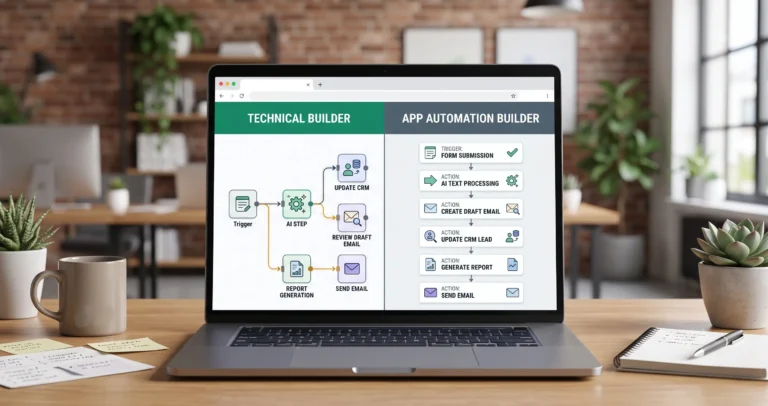
Zapier is usually easier for simple app-to-app automation. Make is usually stronger when you want a more visual scenario builder with branching paths, filters, and more flexible workflow design. The better choice depends on your workflow complexity, team skill level, integrations, AI needs, pricing sensitivity, and how much control you want over the automation.
If you are new to automation, start with our AI automation for small business guide. If you need practical use cases before choosing a tool, read 15 AI automation workflow examples for small businesses.
If you are still choosing your wider automation stack, read Best AI Automation Tools for Small Business before committing to a workflow builder.
If n8n is also on your shortlist, compare n8n vs Zapier and n8n vs Make for AI automation before making your final decision.
Quick Verdict: Make vs Zapier
For most small businesses, the decision comes down to this:
- Choose Zapier if you want simple app-to-app automations, fast setup, and a beginner-friendly workflow model.
- Choose Make if you want a visual scenario builder, more flexible routing, filters, branching logic, and stronger control over multi-step workflows.
Zapier is often the easiest starting point for non-technical users who want to connect common business apps quickly. Make is often better when your workflow needs more visual structure, conditional paths, and data movement between several tools.
A simple “new form submission → create CRM contact → send Slack alert” workflow may be easier in Zapier. A more complex workflow with multiple routes, filters, different outcomes, and several connected modules may fit Make better.
What Are Make and Zapier?
What Is Zapier?
Zapier is a workflow automation platform that connects apps and services through automated workflows called Zaps.
A Zap usually starts with a trigger and then runs one or more actions. For example, a new lead form submission can trigger a Zap that creates a CRM contact, sends an email, updates a spreadsheet, or notifies a team.
You can review Zapier’s official explanation of Zap workflows here: Zapier key concepts documentation.
Zapier is useful for workflows such as:
- sending form submissions to a CRM,
- creating tasks from emails,
- syncing spreadsheets with business apps,
- sending team notifications,
- automating simple lead follow-up,
- connecting common tools without technical setup.
What Is Make?
Make is a visual automation platform for building scenarios that connect apps, move data, transform information, and trigger actions across business tools.
In Make, a scenario is an automated workflow made from modules. Modules can watch for new data, search for information, create or update records, transform data, or send information to another app.
You can review Make’s official scenario and module documentation here: Make scenario documentation and Make module types documentation.
Make is useful for workflows such as:
- visual lead routing systems,
- multi-step CRM updates,
- customer support triage,
- conditional routing with filters,
- Google Sheets and database automations,
- AI-assisted business workflows,
- operations workflows with multiple branches.
Make vs Zapier Comparison Matrix
The easiest way to compare Make vs Zapier is to look at how each tool handles setup speed, workflow flexibility, visual building, AI automation, and scaling.
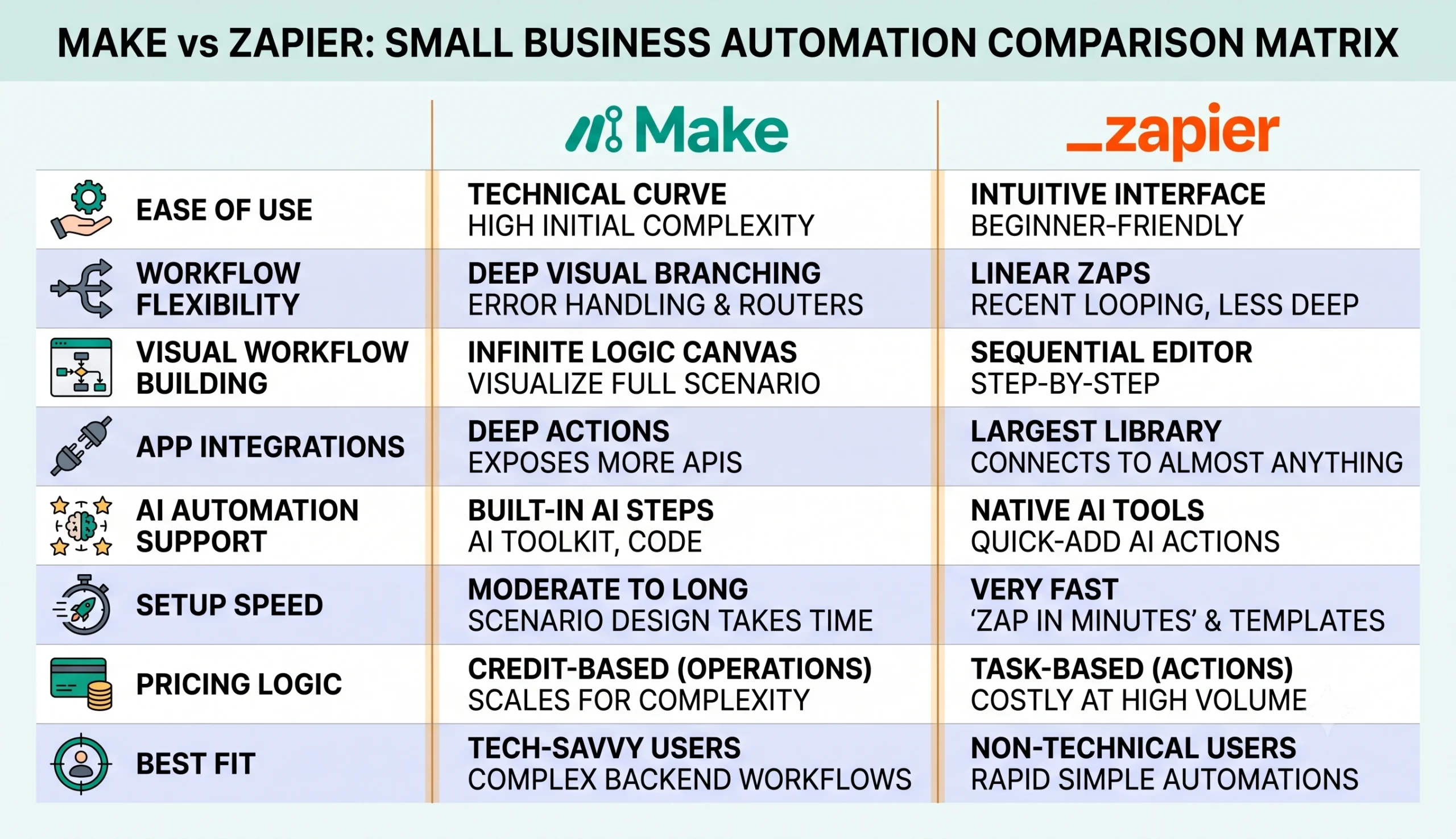
| Category | Zapier | Make |
|---|---|---|
| Ease of use | Usually easier for beginners and simple app connections. | Visual, but may require more workflow planning for complex scenarios. |
| Workflow style | Trigger-and-action workflow model. | Visual scenario builder with modules, routers, filters, and branches. |
| Workflow flexibility | Good for common business automations. | Often stronger for visual multi-step workflows and conditional paths. |
| AI automation | Useful for adding AI steps into simple Zaps. | Useful for AI-assisted scenarios and more visual process design. |
| Setup speed | Very fast for simple app-to-app workflows. | Fast for visual builders, but complex scenarios need planning. |
| Best fit | Small teams that want the simplest automation setup. | Small teams that want visual workflows with more routing flexibility. |
Ease of Use
Zapier is often easier for beginners because the workflow model is straightforward. You choose a trigger, choose one or more actions, connect your apps, test the Zap, and turn it on.
This makes Zapier attractive for founders, marketers, assistants, consultants, and operators who want to automate repetitive work without learning a more complex workflow builder.
Make is also visual, but it encourages users to think in scenarios, modules, routes, filters, and data flow. This can feel more powerful once you understand it, but it may require more planning than a simple Zap.
Workflow Flexibility
Make is often stronger when workflows become more visual and multi-step. Its scenario builder can help you see how data moves from one app to another, where routes split, and how filters decide what happens next.
Make can be useful when your workflow includes:
- multiple branches,
- filters and routing rules,
- data transformation between apps,
- several connected business tools,
- different outcomes based on customer type,
- more visual workflow planning.
Zapier can still handle many multi-step workflows, but it is usually at its best when the process is clear and linear. For example, “new form submission → create CRM contact → notify the sales team” is a natural Zapier-style workflow.
Make’s router feature allows a scenario flow to branch into different routes, with filters deciding which route should process the data. You can review Make’s official router documentation here: Make router documentation.
AI Automation Capabilities
Both Make and Zapier can be used for AI automation. The difference is usually how the AI step fits into the workflow.
Zapier can be useful when you want to add AI into a simple app workflow. For example, a Zap can receive a form submission, use AI to summarize or classify the request, then update a CRM or notify the team.
Zapier provides AI by Zapier, which can analyze and return data inside a Zap. You can review Zapier’s official documentation here: AI by Zapier documentation.
Make can also support AI-assisted workflows through AI-related features and Make AI Agents. This can be useful when your workflow needs AI inside a more visual scenario with multiple steps, filters, and routes.
You can review Make’s official AI Agents documentation here: Make AI Agents documentation.
Common AI automation tasks both tools can support include:
- lead scoring and qualification,
- support ticket classification,
- email summarization,
- CRM note extraction,
- document data extraction,
- AI-assisted routing,
- drafting replies for human review,
- report generation.
For practical examples, read our guide to AI automation workflows for small business.
App Integrations and Ecosystem
Zapier is widely known for connecting common business apps quickly. This is one of its strongest advantages for small businesses that use popular tools for email, CRM, spreadsheets, forms, calendars, ecommerce, project management, and notifications.
Make also supports many app connections, but its advantage is often the visual scenario builder and the way users can structure workflows with modules, routes, and filters.
In simple terms:
- Zapier is often stronger when you want the quickest path to connect common apps.
- Make is often stronger when you want to visually design a workflow with more conditional logic.
Pricing Logic and Scaling
Pricing changes over time, so do not choose Make or Zapier based only on old screenshots, outdated reviews, or one-time comparisons. Always check current pricing pages and usage rules before committing.
The more important question is not “Which tool is cheaper today?” The better question is:
How will the cost behave when the workflow runs hundreds or thousands of times per month?
Make uses credits as part of its usage model, and its documentation explains credits and operations as related but distinct concepts. Zapier has its own plan and task logic, so the cost comparison depends on how many automations you run, how many steps they include, and what apps or AI features you use.
You can review Make’s official usage documentation here: Make credits and operations documentation.
| Cost Factor | Why It Matters |
|---|---|
| Workflow volume | High-volume automations can become more expensive as runs increase. |
| Number of steps | More actions, modules, or paths can increase usage and complexity. |
| AI usage | AI steps may add usage costs depending on the AI provider and workflow setup. |
| Premium apps | Some app connections or advanced features may depend on plan level. |
| Maintenance time | A more flexible workflow may require more time to design, test, and document. |
Best Use Cases for Each Tool
When Zapier Is Usually a Better Fit
Zapier may be the better first choice when your business wants fast setup and simple app-to-app automation.
Zapier is often a good fit for:
- form-to-CRM workflows,
- simple lead notifications,
- email alerts,
- spreadsheet updates,
- calendar and task automations,
- basic marketing operations,
- non-technical teams that want quick automation.
When Make Is Usually a Better Fit
Make may be the better fit when your workflows need more visual control, branching paths, filters, and multi-step scenario design.
Make is often a good fit for:
- visual lead routing workflows,
- customer support triage,
- multi-step CRM updates,
- conditional workflows with filters,
- content operations workflows,
- Google Sheets and database automations,
- small teams that want more flexible no-code workflow design.
What About n8n?
Many businesses compare Make vs Zapier vs n8n because all three tools can help automate business workflows.
n8n is often the more technical option. It can be a strong fit when you need deeper workflow control, custom APIs, self-hosting, advanced AI workflow logic, or more developer-friendly automation.
If your decision is specifically between n8n and Zapier, read our n8n vs Zapier comparison. If your decision is between n8n and Make, read our n8n vs Make for AI automation comparison.
If you are not sure whether you need Zapier, Make, n8n, a CRM automation tool, a support AI agent, or a broader operations stack, start with Best AI Automation Tools for Small Business before choosing between individual workflow builders.
A simple way to think about the three tools:
- Zapier: best for simple app-to-app automations and fast beginner-friendly setup.
- Make: best for visual scenario building, branching, filters, and flexible no-code workflows.
- n8n: best for technical control, self-hosting, custom APIs, and advanced AI workflows.
Decision Framework for Small Businesses
Use this framework before choosing between Make and Zapier.
| Question | Choose Zapier If… | Choose Make If… |
|---|---|---|
| Who will build the workflow? | A non-technical founder, marketer, assistant, or operator. | A user who is comfortable planning visual scenarios and logic. |
| How complex is the workflow? | Mostly simple trigger-and-action automation. | Multi-step workflow with routes, filters, and different outcomes. |
| How fast do you need to start? | You want the fastest path to connect apps. | You can spend more time designing a flexible workflow. |
| How important is visual workflow design? | You only need a clear linear automation. | You want to see and manage workflow paths visually. |
| How important is long-term flexibility? | Your workflows are mostly common app connections. | You expect more complex scenarios as your business grows. |
Final Recommendation
For many small businesses, Zapier is the easier starting point if the goal is to connect common apps quickly and automate simple repetitive tasks.
Make is often the better choice if you want a more visual workflow builder, branching logic, filters, and more control over how data moves between tools.
The best decision is not based on which tool is more popular. It is based on the workflow you want to build, the person who will maintain it, and how complex the automation will become over time.
Before choosing either platform, follow this path:
- Start with the Start Here page if you are new to TakeYourAI.
- Read the AI automation for small business guide to understand the foundation.
- Study 15 practical AI automation workflow examples to choose a real business process.
- Read Best AI Automation Tools for Small Business if you need to choose your wider automation stack first.
- Compare n8n vs Zapier and n8n vs Make if n8n is also on your shortlist.
- Explore workflow templates before building your first system.
- Return to tool comparisons when you are ready to choose your stack.
Use Zapier when speed, simplicity, and common app connections matter most. Use Make when visual workflow design, conditional logic, and flexible no-code scenarios matter more.
FAQ
Is Make better than Zapier?
Make can be better for visual workflows, branching paths, filters, and more flexible scenario design. Zapier can be better for beginners who want simple app-to-app automation and fast setup.
Is Zapier easier than Make?
For many beginners, Zapier is easier because its trigger-and-action model is simple. Make is also visual, but it may require more planning when scenarios become complex.
Can Make and Zapier both be used for AI automation?
Yes. Both tools can be used for AI automation workflows such as summarization, classification, routing, CRM updates, lead scoring, and support triage. The right choice depends on workflow complexity and how you want to manage the AI step.
Which is better for small businesses, Make or Zapier?
Zapier is often better for small businesses that want fast setup and simple automations. Make is often better for small businesses that want visual workflow building, routing, filters, and more flexible no-code automation.
Should I choose Make, Zapier, or n8n?
Choose Zapier for simple app-to-app automation, Make for visual scenario building and flexible no-code workflows, and n8n for deeper technical control, custom APIs, self-hosting, and advanced AI workflows. For a broader stack overview, read Best AI Automation Tools for Small Business. If n8n is part of your shortlist, also compare n8n vs Zapier and n8n vs Make.
Is Make cheaper than Zapier?
Not always. The cost depends on workflow volume, number of steps or modules, AI usage, plan limits, premium features, and how often automations run. Always check current pricing and estimate cost based on your actual workflow.
Can I switch from Zapier to Make later?
Yes, but switching requires rebuilding workflows, reconnecting apps, testing logic, and checking data formats. To reduce migration problems, document your triggers, inputs, actions, rules, and expected outputs from the beginning.
Can I switch from Make to Zapier later?
Yes, but complex Make scenarios with routers, filters, and multiple paths may not translate into Zapier in exactly the same way. You should review each workflow before migrating.
Should I choose the tool before designing the workflow?
No. It is better to define the workflow first: trigger, input data, AI step, rules, action, human review, and measurement. Then choose the tool that fits the workflow. If you need help choosing the wider stack, read Best AI Automation Tools for Small Business.